 Technopulse



A Shopify CRO checklist is a page by page list of the fixes that remove friction between a visitor landing and an order being placed: speed, trust, product page clarity, cart and checkout, and retention. Work through it in the order below, fix the biggest leaks first, and measure every change against your own baseline rather than an industry average.
I run conversion work on Shopify stores every week, and the pattern is always the same. Founders spend on ads, traffic shows up, and the store quietly loses most of it at three or four predictable points. This checklist is the one we use internally when we start an audit, rewritten so you can run it yourself.
Key takeaways
- Measure three rates first: sessions to add to cart, add to cart to checkout, and checkout to purchase, split by mobile and desktop.
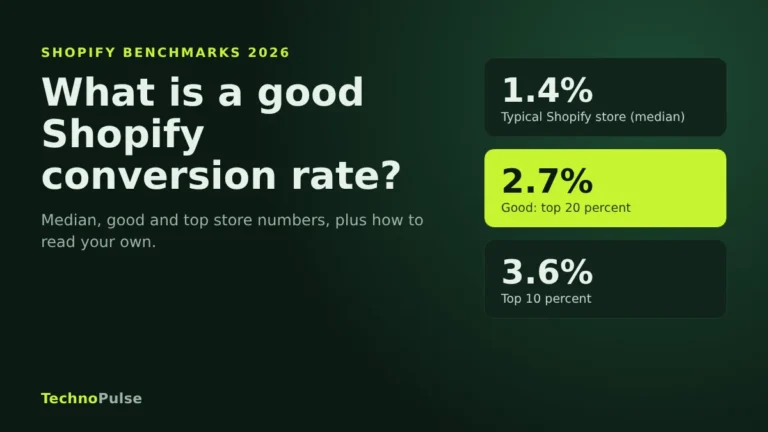
- The Shopify median conversion rate is 1.4 percent and the top 20 percent of stores reach 2.7 percent or more (Littledata, October 2026).
- Extra costs are the top reason shoppers abandon checkout (40 percent, Baymard Institute), so show total cost before checkout.
- Fix what touches every session first: cost transparency, accelerated checkout and a sticky add to cart button.
- Product pages and retention flows carry the largest long term lift.
Before you start: know your real conversion rate
Benchmarks are useful only as a sanity check. Littledata’s live Shopify benchmark, built from 433 stores over a 90 day window ending October 2026, puts the median conversion rate at 1.4 percent, the top 20 percent of stores at 2.7 percent or above, and the top 10 percent at 3.6 percent or above (Littledata). If you sit under the median, the fixes below are likely to move you. If you sit above it, your gains will come from the product page and retention sections.
Pull three numbers from Shopify Analytics before you change anything:
- Sessions to added to cart rate (how persuasive your product pages are)
- Added to cart to reached checkout rate (how much your cart leaks)
- Reached checkout to purchased rate (how much your checkout leaks)
Split each one by mobile and desktop. The biggest gap tells you which section of this checklist to start with.

Section 1: Speed and stability (fixes 1 to 6)
Google defines a good experience as Largest Contentful Paint at 2.5 seconds or less, Interaction to Next Paint at 200 milliseconds or less, and Cumulative Layout Shift at 0.1 or less, measured at the 75th percentile of real visits (web.dev). Most stores we audit fail on mobile, not desktop.
- Check field data, not just a lab score. Open PageSpeed Insights for your home page, a collection and your best selling product. Look at the real user section first.
- Audit installed apps. Every app that injects script on every page costs load time. Remove anything you no longer use and check that uninstalled apps did not leave code in your theme.
- Size the hero image properly. The largest image above the fold is usually your LCP element. Serve it at the size it displays and do not lazy load it.
- Reserve space for banners and reviews widgets. Elements that pop in late push content down and wreck CLS, and they cause mis taps on mobile.
- Limit custom fonts. Two families and a handful of weights is plenty.
- Test on a mid range Android phone. Your own iPhone on office wifi is the best case, not the typical case.
If this section is where your store struggles, our Shopify speed optimization work starts here.
Section 2: Home and collection pages (fixes 7 to 11)
- Say what you sell and why it is better in one line above the fold. A lifestyle image without a clear claim leaves cold traffic guessing.
- Show proof early. Review count, star rating and a recognisable guarantee belong near the top, not in the footer.
- Make navigation match how customers shop. Use the words customers search with, and keep the main menu short on mobile.
- Add filters and sorting to large collections. Size, price, use case and best sellers are the usual winners.
- Show price, rating and key variant on collection cards. Shoppers should not have to open every product to compare.
Section 3: Product pages (fixes 12 to 20)
This is where most stores win or lose. A visitor arriving from an ad usually lands here first.
- Lead with the outcome, then the features. The first lines under the title should answer “what will this do for me”.
- Use at least five real images, including scale and in use shots. Add a short video if the product moves, folds or fits.
- Keep the add to cart button visible on mobile. A sticky add to cart bar is one of the most reliable quick wins we ship.
- Show delivery time and returns next to the button. These are top reasons people abandon later, so answer them early.
- Put reviews with photos high on the page. Show the total count and let shoppers filter by rating.
- Answer the top five objections in an FAQ block. Pull them from support tickets and reviews, not from guesswork.
- Make variant selection obvious. Use swatches or buttons instead of dropdowns, and show out of stock variants clearly.
- Add a size guide or fit finder where fit matters. It reduces both abandonment and returns.
- Offer a bundle or subscription option where it fits. This lifts average order value without discounting.
Section 4: Cart and checkout (fixes 21 to 26)
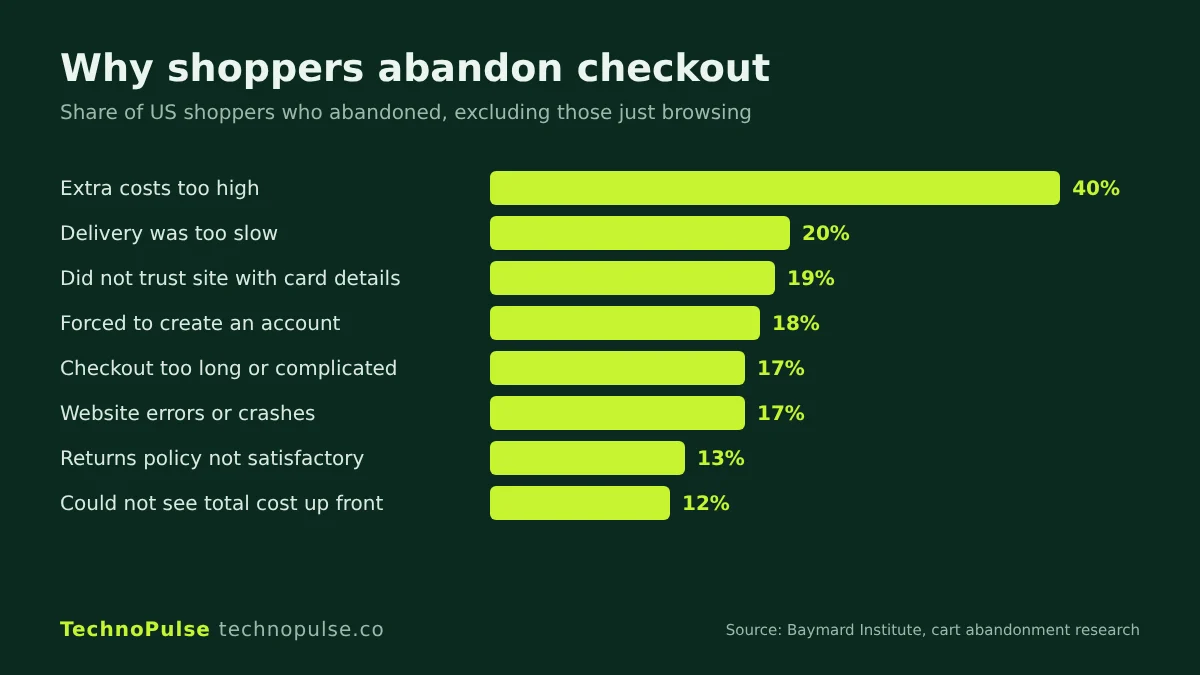
Baymard Institute’s running average across 50 studies puts documented cart abandonment at 70.22 percent. Among shoppers who were not just browsing, the top reason is extra costs being too high (40 percent), followed by slow delivery (20 percent), not trusting the site with card details (19 percent), being forced to create an account (18 percent) and a checkout that is too long or complicated (17 percent) (Baymard Institute).
- Show total cost before checkout. Add a shipping estimate or a free shipping progress bar in the cart.
- Use a slide out cart drawer. Keep shoppers on the page and show one relevant add on, not five.
- Enable accelerated checkouts. Shopify reports that Shop Pay can raise conversion by up to 50 percent compared with guest checkout (Shopify). Add Apple Pay, Google Pay and PayPal as well.
- Never force account creation. Guest checkout should always be available.
- Place trust signals at the payment step. Secure payment badges, your returns promise and a support contact.
- Test discount code behaviour. An empty discount box sends shoppers off to search for codes. Prefill offers through links where you can.
Section 5: Retention and recovery (fixes 27 to 30)
- Run abandoned checkout and browse abandonment flows. In Klaviyo, trigger them from real onsite events and keep the first message within a few hours.
- Capture email and SMS with a clear offer. A popup that appears after engagement, not on the first second, converts better and annoys less.
- Send a post purchase flow that sets up the second order. Usage tips, a review request and a timed replenishment reminder.
- Track repeat purchase rate monthly. For one physician led supplement brand we work with, 85 percent of orders now come from returning customers, which is what makes paid acquisition affordable.
How to prioritise the checklist
Do not try all 30 fixes at once. Score each one on three things: how many sessions it touches, how big the leak is in your funnel numbers, and how hard it is to ship. Start with fixes that touch every session and take a day or less, such as cart cost transparency, accelerated checkouts and the sticky add to cart bar. Then move to product page content, which takes longer but usually carries the largest lift.
Change one major thing per page at a time and compare at least two full weeks before and after, or run a proper A/B test if you have the traffic. On one outdoor camping gear store, working through this sequence alongside paid media and email, online sales grew 5.8 times and the conversion rate rose 49 percent. You can read how in the outdoor gear case study, and see a focused example in our fly fishing gear CRO project.
Common mistakes we see
- Copying a competitor’s layout. Their audience, price point and traffic mix are not yours.
- Testing button colours before fixing the offer. Clarity and trust move more than cosmetics.
- Ignoring mobile. Most DTC traffic is mobile, so review every change on a phone first.
- Calling a test after three days. Weekday and weekend behaviour differ, so run at least full weeks.
Frequently asked questions
What is a good conversion rate for a Shopify store?
Littledata’s October 2026 benchmark puts the Shopify median at 1.4 percent, with the top 20 percent of stores at 2.7 percent or higher. Your category, price point and traffic source change what is realistic, so compare against your own trend first. Our guide to what a good Shopify conversion rate is in 2026 breaks the numbers down by industry.
What should a Shopify CRO audit include?
Funnel data split by device, Core Web Vitals, a review of home, collection, product, cart and checkout pages, and your email and SMS recovery flows. Every finding should be tied to a number in your analytics.
How long does Shopify CRO take to show results?
Quick fixes like cart transparency and accelerated checkouts can show within two to four weeks. Product page and offer changes need a full test cycle, usually four to eight weeks depending on traffic.
Do I need an agency for Shopify CRO?
Not to start. You can run the first pass of this checklist yourself. An agency helps when you need testing, design and development shipped quickly, or when your traffic is large enough that a small lift is worth a lot.
Get a free Shopify store audit
We have helped more than 200 DTC brands since 2021, and we hold a 5.0 rating on Google from over 40 client reviews. If you want a second pair of eyes on your funnel, our team will run this checklist against your store and send you a prioritised list of fixes. Start with a free store audit, or see how our Shopify CRO services and Shopify development teams work.
Keep reading

Founder and CEO of TechnoPulse. Leads Shopify development, CRO and growth strategy for DTC brands in the US, Europe and Australia.
More about Haroon

 Technopulse