
Shopify Abandoned Checkout Emails That Recover Sales
How to set up Shopify abandoned checkout emails that recover sales: Shopify Messaging or Klaviyo, a three email sequence, the filters that matter and 2026 benchmarks.
 Haroon Ali ShahOctober 23, 2026 · 11 min read
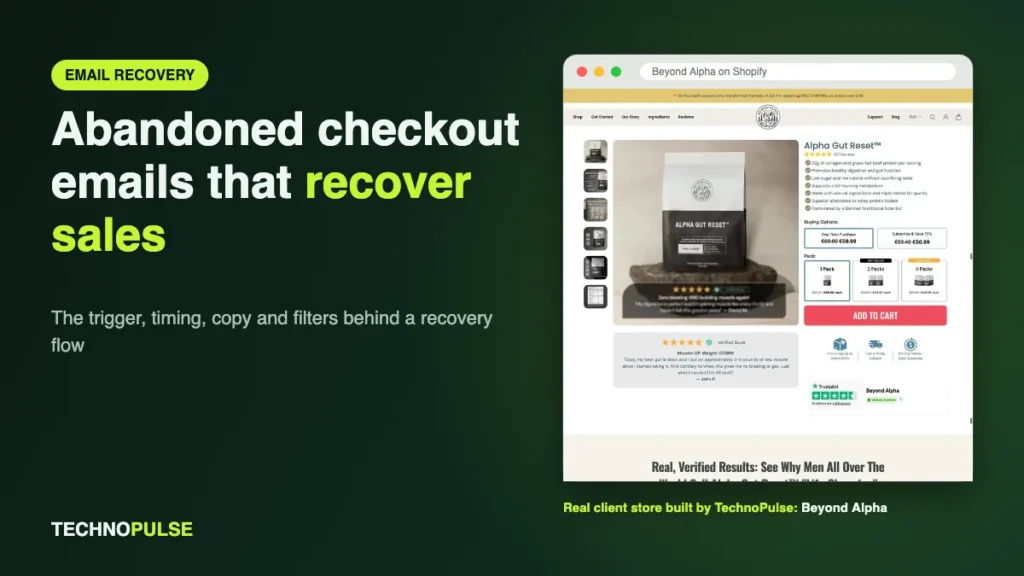
A Shopify abandoned checkout email is an automatic message sent to a shopper who entered their email at checkout but did not pay, with a link that reopens their checkout. The flows that recover the most sales use two or three emails over about 48 hours, stop the moment the shopper orders, and answer the reason they left instead of just repeating the cart.
Most stores switch on the default email, see a few recovered orders and move on. That leaves money on the table. Baymard Institute puts the average documented cart abandonment rate at 70.22 percent, so for every ten shoppers who start a cart, seven leave without buying. Some of them were only browsing. Many were close, and a well built recovery flow is the cheapest way to win them back.
This guide covers how Shopify’s built in email works, when to move the flow into Klaviyo, the exact timing and filters we use, what to write in each email, and the benchmarks that tell you whether your flow is doing its job.
Key takeaways
- Trigger the flow on Started Checkout and stop it the moment the shopper places an order.
- Send two or three emails: at 2 to 4 hours, about 24 hours and about 48 hours after the shopper leaves.
- Email one reminds, email two answers doubts about cost, delivery and trust, and email three is an optional nudge for high value carts.
- Judge the flow on revenue per recipient. Klaviyo puts the 2026 average for abandoned cart email at $6.77 and the top 10 percent at $13.70.
- Run recovery in one system only, Shopify Messaging or Klaviyo, never both.
Abandoned cart vs abandoned checkout: what is the difference?
The two terms get used as if they mean the same thing. They do not, and the difference changes who you can email.
- Abandoned cart: a shopper added a product to the cart and left. You can only email them if you already know who they are, for example a subscriber or a returning customer whose browser is identified.
- Abandoned checkout: a shopper reached checkout, typed their email or phone, and left before paying. This is the warmest group you will ever email, because they have already decided what they want and started to pay for it.
In Klaviyo the split is clear. Its help centre explains that a flow triggered by Added to Cart targets abandoned carts, while a flow triggered by Started Checkout targets abandoned checkouts. If you run both, Klaviyo recommends adding a filter to the cart flow so anyone who later starts checkout only gets the checkout flow. Otherwise the same person gets two sets of reminders and you look desperate.
This guide focuses on the checkout flow because it carries the highest intent and usually earns the most per email sent.
How Shopify’s built in abandoned checkout email works
Shopify has abandoned checkout emails built in. According to Shopify’s help centre, a checkout counts as abandoned when the customer has entered an email address, has not paid, and the checkout stays incomplete for more than ten minutes.
To switch on the automation in the current admin:
- Go to Apps, then Messaging, then Automations.
- Open the abandoned checkout automation and choose to edit its settings.
- Turn on automatic sending, choose who it sends to and how long after abandonment it sends, then save.
A few details from Shopify’s documentation are worth knowing before you rely on it:
- It only covers the Online Store and Buy Button channels. Checkouts from POS or third party sales channels do not get a recovery email.
- Shopify skips the email in several cases, for example when the shopper buys before it sends, when the products are no longer available, or when a phone number was entered instead of an email.
- Anyone who opens the recovery link can continue that checkout, and you cannot expire the link once it is sent. Only send it to the shopper.
- Abandoned checkouts older than three months are deleted automatically, so export them if you want the history.
For a new store with modest traffic, Shopify’s automation is a good start. It is free, it is already connected to checkout, and it takes five minutes to set up. Turn it on today if nothing else is running.
When to move the flow to Klaviyo
Once a store has steady traffic, we move recovery into Klaviyo for four reasons:
- Branching: different messages for first time shoppers and repeat customers, or for small and large carts.
- Email and SMS together: one flow that picks the right channel for each shopper, with consent tracked properly.
- Better filters: Klaviyo checks the filters before every message, so a shopper who buys after email one never gets email two.
- Reporting you can act on: revenue per recipient for each message, so you know which email earns its place.
If you move to Klaviyo, turn off Shopify’s abandoned checkout automation at the same time. Two systems sending reminders to the same person is one of the most common mistakes we find in audits.
The Klaviyo setup we use
- Trigger: Started Checkout.
- Flow filter one: Placed Order zero times since starting this flow. This is the filter that stops you emailing people who already bought.
- Flow filter two: has not been in this flow in the last few days, so a shopper who starts and leaves checkout three times in a week gets one sequence, not three.
- Cart block: the dynamic product block that repeats for each item, with image, title, quantity and price.
- Button link: on Shopify, Klaviyo’s return to cart link uses the checkout URL from the event, so the shopper lands back in their own checkout, not on the home page.
The Klaviyo help article on abandoned cart flows walks through each of these settings if you are building from scratch. If you want it built and tested for you, that is part of our Klaviyo email flows setup.
The three email sequence that recovers the most
Klaviyo’s pre built flows wait four hours before the first message, and its guidance suggests sending the first message two to four hours after someone starts a checkout, with a follow up 20 to 48 hours later. Its 2026 benchmark report suggests a three message sequence ending at about 48 hours. The logic is simple: the first email reaches shoppers while intent is highest, the second handles doubts, and the third is a final, optional nudge.
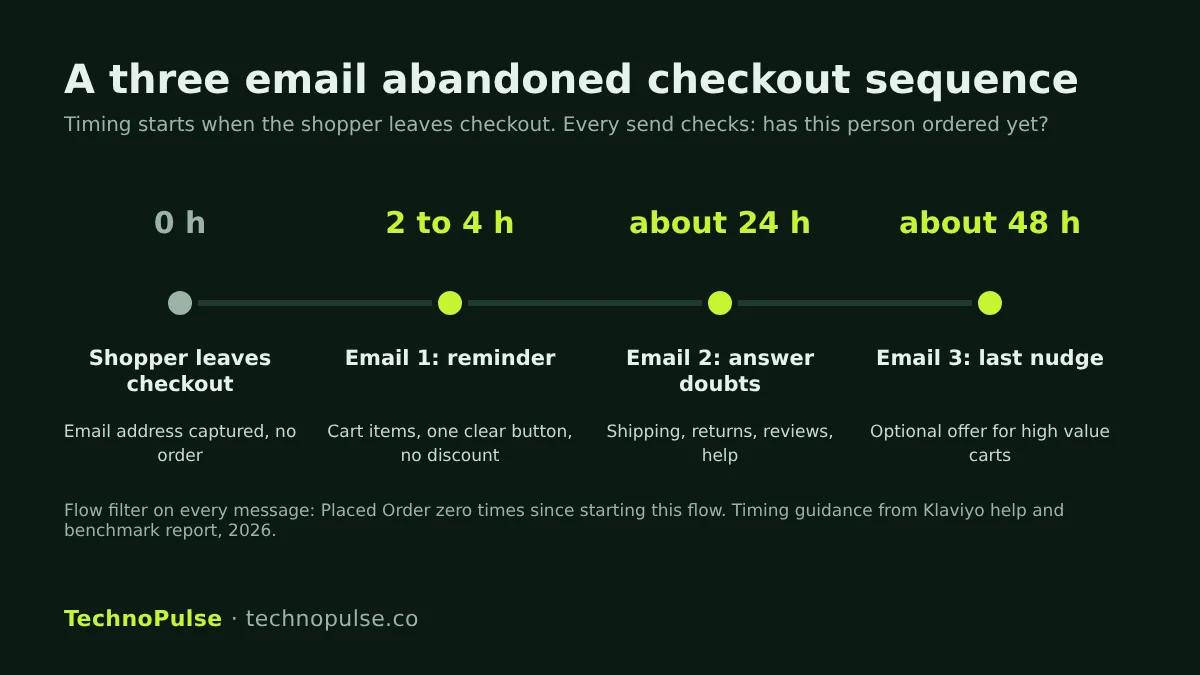
Email 1, two to four hours later: the reminder
The job of the first email is to make finishing easy. The shopper was interrupted, distracted or comparing prices. Do not sell. Show the cart, give one clear button, and get out of the way.
- Subject line ideas: “Your checkout is saved”, “Still thinking it over?”, “You left this behind”.
- Show the product image, name, variant and price exactly as they chose it.
- One button above the fold that returns them to checkout.
- No discount. Shoppers who were going to come back anyway should not learn to wait for a code.
Email 2, about 24 hours later: answer the reason they left
This is the email most stores get wrong. They send the same reminder again, louder. Instead, answer the doubts that stop people paying. Baymard’s research on checkout abandonment shows the biggest reasons clearly.
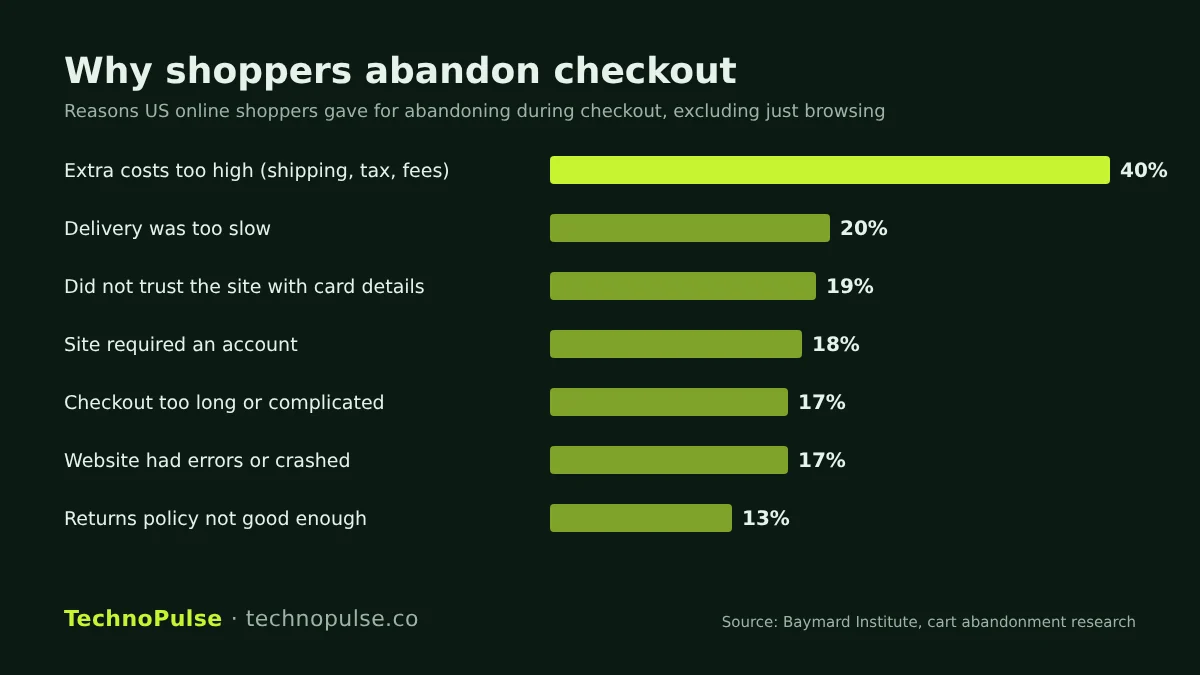
Extra costs such as shipping, tax and fees lead the list at 40 percent, followed by slow delivery at 20 percent and not trusting the site with card details at 19 percent. So the second email should cover:
- Total cost: your shipping threshold and what delivery costs to their region, in plain numbers.
- Delivery time: a realistic arrival window, not “fast shipping”.
- Trust: two or three short reviews of the product in their cart, your returns window and the payment options you accept.
- Help: a reply to this email line, so a shopper with a sizing or ingredient question can ask a person.
Email 3, about 48 hours later: the last nudge
The final email can carry an incentive, but only where the numbers work. Klaviyo’s own report suggests limiting incentives to high value carts, because frequent discounts train shoppers to wait. A simple rule we use: offer free shipping or a small gift above a cart value where your margin can absorb it, and send a plain “still yours if you want it” message to everyone else. You can also suggest one or two similar products in case the item was not quite right.
What good looks like: 2026 benchmarks
Klaviyo’s 2026 abandoned cart benchmark report, based on more than 110,000 Klaviyo customers, gives useful targets:
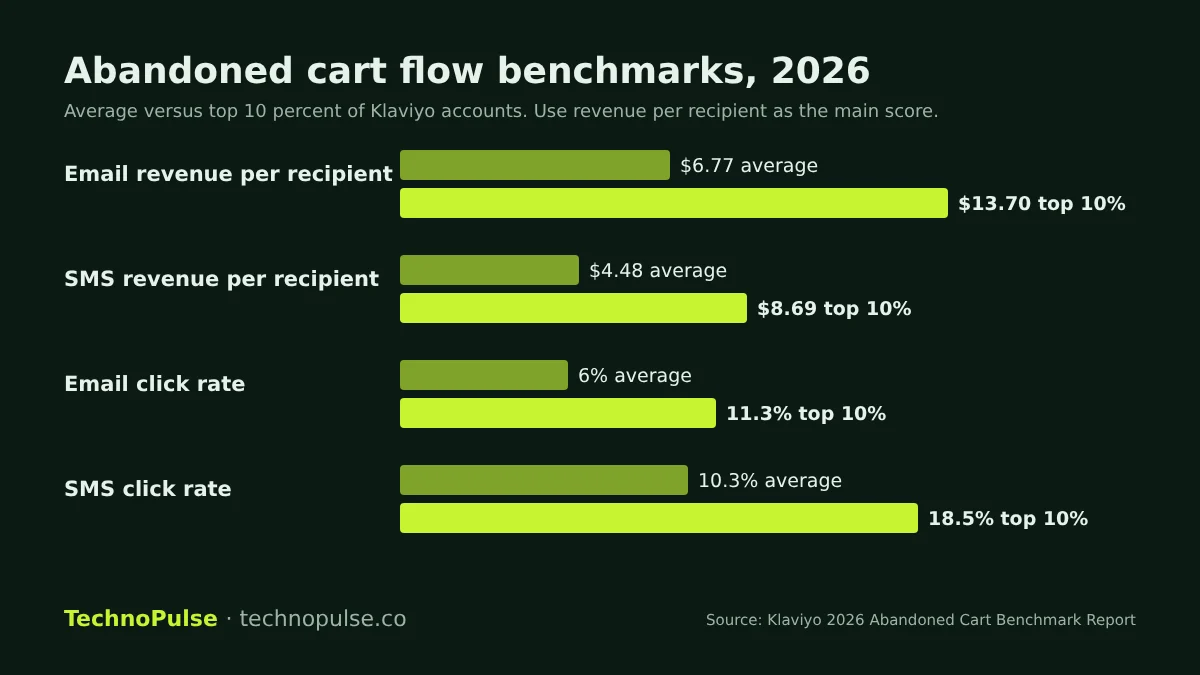
| Abandoned cart flow | Average | Top 10 percent |
|---|---|---|
| Email revenue per recipient | $6.77 | $13.70 |
| Email click rate | 6% | 11.3% |
| SMS revenue per recipient | $4.48 | $8.69 |
| SMS click rate | 10.3% | 18.5% |
Use revenue per recipient as your main score. Open rates are unreliable since mail apps began loading images automatically, and click rate alone ignores what happens after the click. If your flow earns well below the average, the problem is usually one of three things: the first email sends too late, the button does not land in the shopper’s own checkout, or the checkout itself has friction no email can fix.
Fix the checkout, not just the emails
Recovery emails treat the symptom. Baymard estimates the average large ecommerce site could lift its conversion rate by 35.26 percent through better checkout design alone. If a big share of shoppers leave over surprise costs or a forced account, every recovered order is one you paid to lose and then paid again to win back.
Before you write another email, check the basics:
- Show shipping costs or your free shipping threshold on the product page and in the cart, not for the first time at checkout.
- Keep guest checkout on and offer accelerated payment options such as Shop Pay, Apple Pay and Google Pay.
- Put delivery estimates and the returns window next to the add to cart button.
- Test checkout on a real phone every month, including discount codes and every payment method.
Our Shopify CRO checklist covers 30 fixes across product, cart and checkout pages, and our guide to what a good Shopify conversion rate is helps you judge whether checkout is your real bottleneck. If you would rather have a team find and fix the friction, that is what our Shopify CRO services are for.
Common mistakes we find in audits
- Two systems sending at once: Shopify’s automation and a Klaviyo flow both live, so shoppers get double reminders.
- No purchase filter: customers who already ordered get “you forgot something” emails, which costs trust and support time.
- The button goes to the home page: the shopper has to rebuild their cart and many simply do not.
- A discount in the first email: margin given away to people who were coming back anyway.
- Texting without consent: SMS reminders sent to numbers that never opted in to marketing texts. Collect consent properly and follow the rules for each country you sell into.
- Never looking at the numbers: nobody checks revenue per recipient by message, so a weak email runs untouched for years.
For an outdoor camping gear brand, we lifted conversion 49 percent and grew online sales 5.8x with a Shopify rebuild, CRO and email working together, not emails alone. You can read the full outdoor gear case study to see how the pieces fit.
Quick setup checklist
- Choose one system for recovery: Shopify Messaging or Klaviyo, never both.
- Trigger on Started Checkout and add the Placed Order zero times filter.
- Send email one two to four hours after abandonment, email two at about 24 hours and email three at about 48 hours.
- Check that the button lands in the shopper’s own checkout on desktop and mobile.
- Keep discounts out of email one and limit them to high value carts in email three.
- Review revenue per recipient for each message once a month.
- Fix the top checkout friction points so fewer shoppers need recovering.
Recovering the order is half the job. The next step is turning that buyer into a repeat customer, which our guide to Shopify post purchase emails covers email by email.
Before you tune the emails, fix the checkout itself: our Shopify checkout optimization guide covers costs, wallets, fields and Thank you page tracking.
FAQ
Does Shopify send abandoned checkout emails automatically?
Yes, once you turn it on. In the Shopify admin go to Apps, Messaging, Automations, open the abandoned checkout automation and enable automatic sending. It only covers checkouts where the shopper entered an email and did not pay for more than ten minutes.
How long after abandonment should the first email send?
Two to four hours is a good default. It reaches shoppers while the purchase is still on their mind, without looking like you are watching them. Follow up at about 24 and 48 hours.
How many abandoned checkout emails should I send?
Two or three. The first email reaches shoppers while intent is highest, the second answers doubts about cost, delivery and trust, and an optional third gives a final nudge to high value carts. More than three tends to annoy shoppers without adding much revenue.
Should abandoned checkout emails include a discount?
Not in the first email. A discount there trains shoppers to abandon on purpose. If you use one, put it in the last email and limit it to carts above a value where your margin can carry it.
What is a good abandoned cart email benchmark?
Klaviyo’s 2026 report puts average abandoned cart email revenue per recipient at $6.77 and the top 10 percent at $13.70, with an average click rate of 6 percent. Use revenue per recipient as your main measure.
Want us to check your recovery flow?
We have helped more than 200 DTC brands since 2021 and we are a Shopify and Klaviyo partner. If you want a second pair of eyes on your abandoned checkout flow and the checkout itself, get a free store audit and we will show you where orders are leaking and what to fix first.
Related guides

Founder and CEO of TechnoPulse. Leads Shopify development, CRO and growth strategy for DTC brands in the US, Europe and Australia.
More about Haroon