
Shopify Checkout Optimization: 2026 Guide
The checkout fixes that lift Shopify conversion on every plan, what needs Plus, and how to make sure the new Thank you page still tracks every order.
 Haroon Ali ShahNovember 16, 2026 · 9 min read
Shopify checkout optimization means removing every surprise, extra field and moment of doubt between Checkout and Pay now, then measuring checkout completion so you know each change worked. On most stores the biggest wins are showing the full cost before checkout, putting Shop Pay and other express wallets first, cutting optional fields, and making sure the new Thank you page still tracks every order.
Shopify already gives you one of the fastest checkouts in ecommerce, so this is not about rebuilding it. It is about the settings, content and apps around it. Below is the order I work through on client stores, what you can change on every plan, what needs Shopify Plus, and how to prove the lift.
Why the checkout is the cheapest place to find revenue
Shoppers who reach checkout have already chosen a product and decided to buy. Losing them is the most expensive leak in the funnel, because you paid to bring them there. Baymard Institute puts the average documented cart abandonment rate at 70.22 percent across 50 studies, and estimates that the average large ecommerce site can gain a 35.26 percent lift in conversion rate through better checkout design alone (Baymard, cart abandonment statistics).
Not every abandonment is fixable. Baymard finds that many US shoppers were just browsing. But among shoppers who did intend to buy, the top reasons are concrete and most of them are in your control:
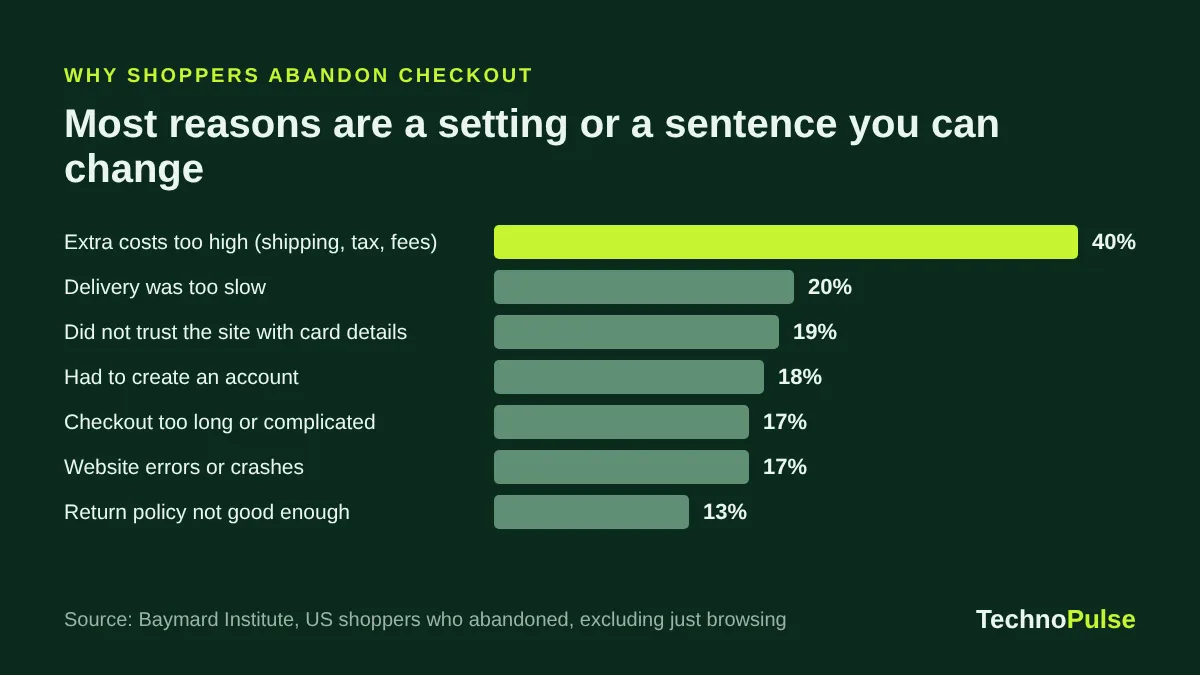
Read that list as a to do list. Extra costs, delivery speed, trust, accounts and length are each a setting or a piece of content you can change this week.
First, measure checkout completion properly
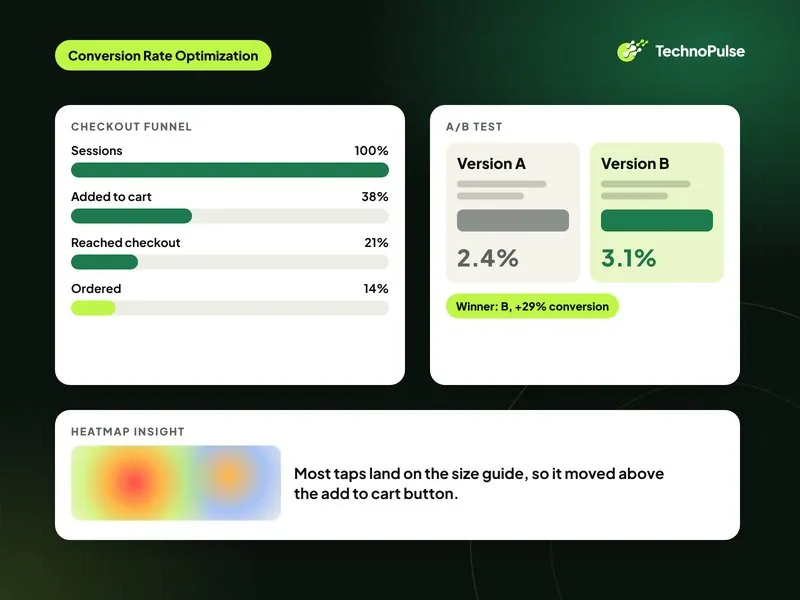
Before you change anything, get a baseline. The number that matters here is checkout completion: orders divided by sessions that reached checkout. Your overall conversion rate moves with traffic quality and ads, so it hides checkout changes.
- In Shopify Analytics, open the conversion funnel and note sessions that reached checkout and sessions that completed checkout for the last 28 days.
- Split it by device. Mobile is usually where the gap is.
- Split it by new versus returning customers. Returning shoppers with saved Shop Pay details complete far more often, so a change in your customer mix can look like a checkout change.
- Write the numbers down with the date. Shopify changed how it counts sessions in September 2026, so compare like with like (what changed in the Shopify session update).
If you want context for the top of the funnel too, our guide to what a good Shopify conversion rate is has current benchmarks by industry.
Fix 1: Show the full cost before checkout
Extra costs are the number one reason shoppers leave, at 40 percent in Baymard’s survey. The fix is not always cheaper shipping. It is no surprises.
- State shipping cost or the free shipping threshold on product pages and in the cart, not only at checkout.
- Add a free shipping progress bar to the cart if you have a threshold.
- For international shoppers, use Shopify Markets to show local currency and, where you can, collect duties at checkout so there is no fee on delivery.
- Put your delivery time next to the shipping price. Slow delivery is the second biggest reason at 20 percent, and a clear date often matters more than speed.
Fix 2: Put express checkout first
Shopify supports Shop Pay, Apple Pay, Google Pay, PayPal and Amazon Pay as accelerated checkouts. They appear in an Express checkout section at the top of checkout and can also appear on product pages, and Shopify orders the buttons to show the fastest option first (Shopify Help Center, accelerated checkouts).
Shopify reports that Shop Pay can lift conversion by up to 50 percent compared with guest checkout (Shopify). That is Shopify’s own figure from a study it commissioned, so treat it as a direction, not a promise. What I see on stores is simpler: when returning customers can pay in two taps, mobile completion goes up.
- Turn on every wallet your payment provider supports for your markets.
- Check that dynamic checkout buttons show on product pages if your average order is one item.
- On the cart, keep the express buttons visible above the fold on mobile.
- If your average order is high enough that shoppers pause, add the buy now pay later option your customers already know.
If you use a third party gateway, test the full flow on a real phone after every change. Our Shopify third party payment gateway guide covers the setup and the fees.
Fix 3: Remove fields and decisions
Baymard’s checkout research found the average checkout had 11.3 form fields in 2024, while most sites need only 8 (Baymard, checkout form fields). Every extra field is one more chance to stop.
In your Shopify admin, go to Settings, then Checkout, and review the customer information options:
- Make company name hidden unless you sell B2B.
- Make address line 2 optional, never required.
- Ask for a phone number only if your carrier needs it, and say why next to the field.
- Keep accounts optional. Forced account creation is a reason for 18 percent of abandonments. Offer an account after the order instead.
- Limit shipping options to two or three clear choices with dates.
Also look at your discount code field. A visible empty box sends some shoppers off to search for codes. If you run frequent promotions, apply them automatically instead of relying on codes.
Fix 4: One page or three page checkout
Shopify’s checkout is one page by default, and you can switch to the three page layout. On desktop the path is Settings, Checkout, Edit next to your configuration, then the gear icon, Checkout layout, and choose One page checkout or Three page checkout (Shopify Help Center, checkout layout).
There is no universal winner. One page usually suits stores with many returning customers and simple orders. Three page can suit higher priced or more complex orders where shoppers want to review each step. Do not switch on a hunch. Run it as a test with a fixed period and compare checkout completion, not overall conversion.
Fix 5: Build trust at the moment of payment
Nineteen percent of shoppers in Baymard’s survey left because they did not trust the site with their card. The checkout itself is secure, but shoppers judge your brand, not Shopify.
- Use the checkout editor to add your logo, brand colours and fonts so checkout looks like the same store.
- Show your returns policy in one sentence near the order summary. An unclear return policy drives 13 percent of abandonments.
- Show the delivery date and a support contact.
- Make sure the cart and checkout load fast on mobile. Site errors and crashes cause 17 percent of abandonments, so fix any app script that throws errors on the cart page. Our guide on how to speed up a Shopify store shows how to find them.
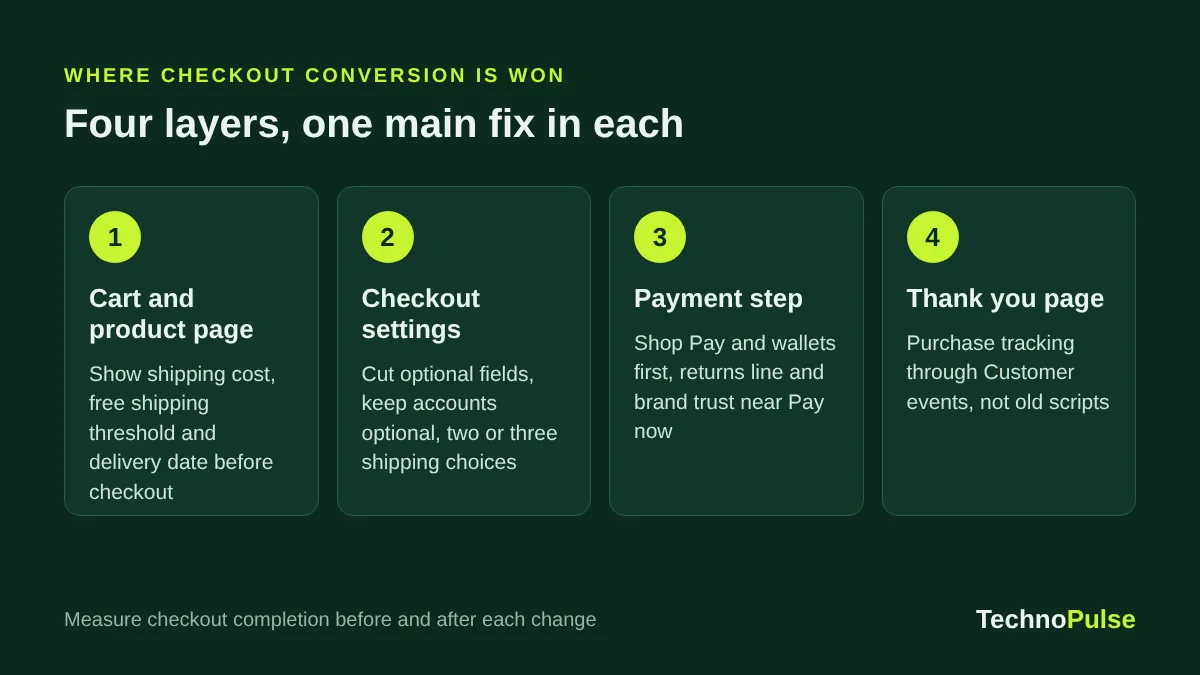
Fix 6: Make sure the Thank you page still tracks every order
This is the fix most stores missed in 2026. Shopify has retired checkout.liquid, Additional scripts and script tags on the Thank you and Order status pages. Plus stores lost them on 28 August 2025 and all other plans on 26 August 2026 (Shopify developer documentation).
If your Meta, Google Ads, TikTok or affiliate purchase tags used to live in Additional scripts, they may have stopped firing. The checkout still works, so nobody notices until ad platforms start optimising on fewer purchases than you actually made.
- Go to Settings, then Customer events, and check that Meta, Google and your other channels are connected through their apps or a custom pixel.
- Compare the purchases each ad platform reported last week with your Shopify orders. A gap above about 10 to 15 percent needs a look.
- Rebuild any post purchase survey, upsell or order tracking widget as an app block on the new Thank you page.
This does not lift checkout completion directly, but it protects your ad performance, and poor tracking quietly raises your cost per order.
What you can do on Shopify Plus
On Plus you get more control. Checkout UI extensions for the information, shipping and payment steps are available only to Plus stores (Shopify developer documentation). That means you can add things like delivery date pickers, gift messages, trust content or a single relevant offer inside checkout.
Use that power carefully. Every block you add to checkout is something the shopper has to read. Add one thing at a time and test it. If you are deciding whether these features justify the upgrade, see Shopify vs Shopify Plus.
Recover the shoppers who still leave
Even a well tuned checkout loses shoppers. Shopify can send an abandoned checkout email on every plan, and Klaviyo can run a fuller flow with a Started Checkout trigger, cart contents and a sensible delay. Our Shopify abandoned checkout email guide covers timing, the number of emails and current benchmarks.
A two week checkout optimization plan
- Day 1: Record checkout completion by device and customer type for the last 28 days.
- Day 2: Check purchase tracking in Customer events against Shopify orders. Fix any gap first.
- Days 3 to 4: Add shipping costs or the free shipping threshold and delivery dates to product pages and cart.
- Day 5: Turn on every relevant wallet and check express buttons on mobile.
- Day 6: Cut optional fields and shipping options. Make accounts optional.
- Day 7: Brand the checkout and add the one line returns note.
- Days 8 to 14: Leave it alone, then compare checkout completion with your baseline. Test layout changes only after this.
For the rest of the store, our Shopify CRO checklist lists 30 fixes beyond checkout, from product pages to navigation.
What this looks like on a real store
Checkout work rarely happens alone. On an outdoor gear brand we rebuilt the product pages, cart and checkout journey together, and online sales grew 5.8x with a 49 percent conversion lift (read the outdoor gear case study). The checkout fixes above are the part every store can copy in a week.
Want a second pair of eyes? Our Shopify CRO team has helped 200+ DTC brands since 2021. Book a free store audit and we will review your cart, checkout and tracking and send you the fixes in order of impact.
To keep these fixes in place month after month, follow our Shopify store maintenance checklist.
Frequently asked questions
Can you customize the Shopify checkout without Plus?
Yes, partly. On every plan you can brand the checkout, choose a one page or three page layout, set which fields are required, turn on wallets and add app blocks to the Thank you and Order status pages. Adding custom content inside the information, shipping and payment steps needs Shopify Plus.
What is a good checkout completion rate on Shopify?
It depends on your mix of new and returning customers, device and price point, so the best benchmark is your own baseline. Track sessions that completed checkout divided by sessions that reached checkout every month, split by mobile and desktop, and work to raise it.
Is one page checkout better than three page checkout?
Not always. One page is Shopify’s default and usually suits simple orders and returning customers. Three page can work better for complex or high priced orders. Test it for a fixed period and judge it on checkout completion.
Why are my ad platforms reporting fewer purchases since August 2026?
On plans other than Plus, Additional scripts and script tags on the Thank you and Order status pages stopped running on 26 August 2026. Tags that lived there need to move to Customer events through the channel apps or a custom pixel.
Does Shop Pay really increase conversion?
Shopify reports up to a 50 percent lift versus guest checkout, from a study it commissioned. Results vary by store, but returning shoppers with saved details check out much faster, so it is worth turning on for almost every store.

Founder and CEO of TechnoPulse. Leads Shopify development, CRO and growth strategy for DTC brands in the US, Europe and Australia.
More about Haroon