
How to Increase Ecommerce Sales: 9 Steps for 2026
Nine steps to increase ecommerce sales in the order that pays back first: checkout friction, product pages, speed, email flows, order value, retention, then traffic.
 Haroon Ali ShahMay 13, 2025 · 8 min read
To increase ecommerce sales, fix the store before you buy more traffic: remove checkout friction, make product pages answer buying questions, speed up mobile, and switch on the email flows that sell while you sleep. Then raise order value, earn the second order, and only scale ads once every visitor is worth more. When you are ready to scale, our Meta ads agency for ecommerce team builds campaigns around profit, not just ROAS.
That order matters. Most founders we audit start with ads or discounts, because those feel like action. But if 70 out of 100 carts are abandoned, more traffic just means more abandoned carts. This guide gives you the nine steps we use with DTC brands on Shopify, in the order we run them, with the data behind each one.
Key takeaways
- Sales come from four levers: sessions, conversion rate, average order value and repeat purchases. Work on the cheapest lever first.
- Shopify changed how it counts sessions on 21 September 2026, so rebaseline your conversion rate before you judge any change.
- The average documented cart abandonment rate is 70.22 percent, and surprise costs are the top reason shoppers leave.
- Automated email flows earned nearly 41 percent of email revenue from just 5.3 percent of sends in Klaviyo’s 2026 data.
- Scale paid traffic last, once the store converts and keeps customers.
The ecommerce sales equation
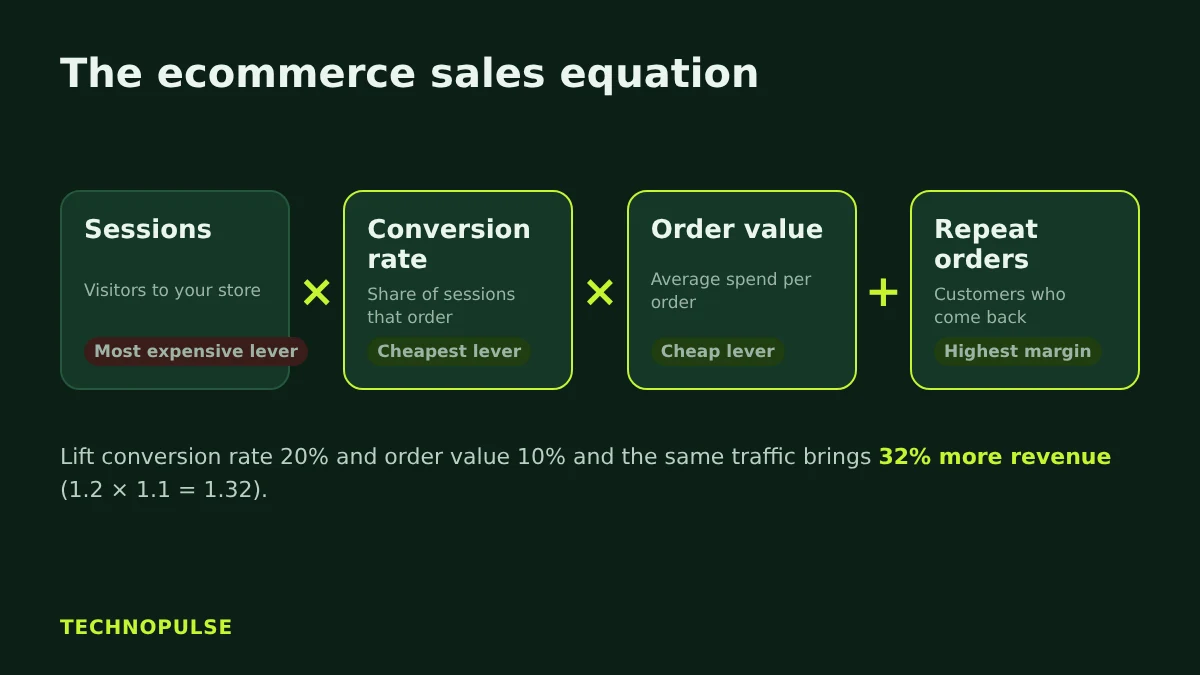
Every online store runs on the same simple formula:
Revenue = sessions × conversion rate × average order value, plus the revenue from customers who come back.
Each lever multiplies the others. Lift conversion rate by 20 percent and average order value by 10 percent, and the same traffic brings in 32 percent more revenue (1.2 × 1.1 = 1.32). That is why we rarely start with traffic. Sessions are the most expensive lever to pull, while conversion rate and order value are usually the cheapest.
Step 1: Check your numbers before you change anything
You cannot grow what you are measuring wrong. On 21 September 2026 Shopify started measuring sessions differently: the default view now focuses on human visitors, bot and system traffic is classified more consistently, and some shopper journeys without a standard pageview stay visible. Shopify says orders and sales are not affected, but sessions, conversion rate, add to cart rate and checkout conversion may all look different, and it advises treating data after that date as a new baseline (Shopify changelog).
So before you start:
- Note the date of the change in your reports, so nobody blames a theme update for a jump that came from measurement.
- Compare post change weeks with each other, not with last year.
- Track revenue per session alongside conversion rate. It combines conversion and order value in one number that is hard to fool.
If you want to know where your store stands, our guide on what a good Shopify conversion rate is in 2026 explains the benchmarks and the measurement change in detail.
Step 2: Find the biggest leak in your funnel
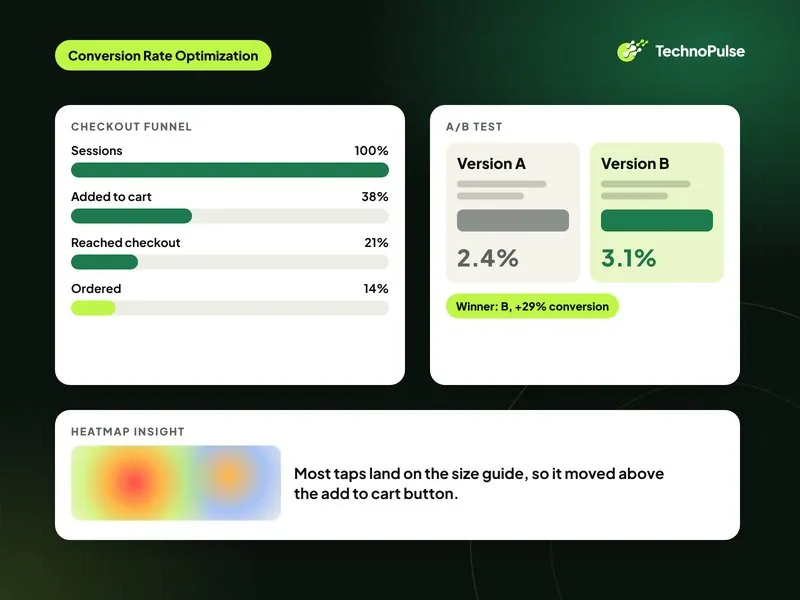
Open the conversion funnel in Shopify Analytics and look at four numbers for the last 30 days, split by mobile and desktop:
- Sessions to added to cart
- Added to cart to reached checkout
- Reached checkout to completed order
- Completed orders to returning customers
The step with the biggest drop on mobile is usually where the money is. A low add to cart rate points to product pages and offer. A big gap between cart and checkout points to shipping costs or a confusing cart. A low checkout completion rate points to checkout friction, payment options or trust. Fix the biggest leak first, then move to the next one. Our walkthrough of the steps of conversion optimization shows how to turn a leak into a test.
Step 3: Remove checkout friction
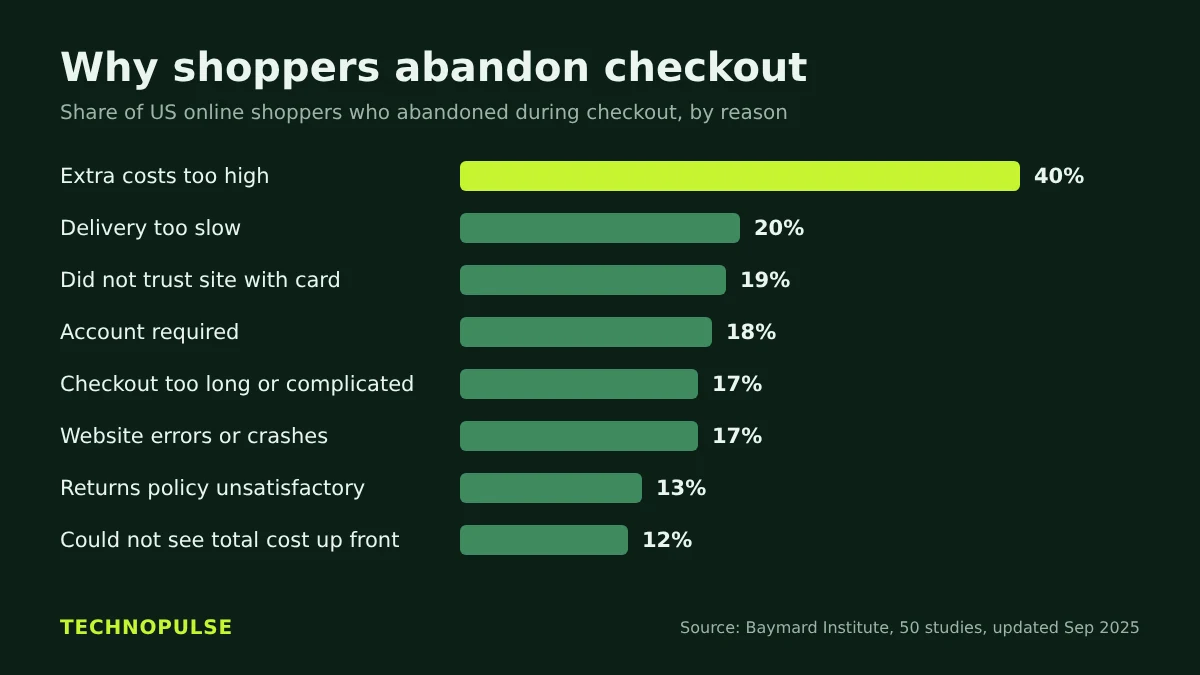
Baymard Institute puts the average documented cart abandonment rate at 70.22 percent across 50 studies. When it asked US shoppers why they abandoned during checkout, the top reasons were clear (Baymard Institute):
Most of these are fixable on Shopify in a day or two:
- Extra costs too high (40 percent): show shipping costs, or a free shipping threshold, on the product page and in the cart, not for the first time at checkout.
- Delivery too slow (20 percent): show an estimated delivery date near the add to cart button.
- Did not trust the site with card details (19 percent): use Shopify Checkout, show familiar payment logos, and put real reviews and a clear returns policy near the buy button.
- Account required (18 percent): allow guest checkout and offer Shop Pay for one tap returns.
- Checkout too long (17 percent): remove optional fields and apps that inject extra steps.
Baymard estimates the average large ecommerce site could lift conversion by 35.26 percent through better checkout design alone. For the full list we work through on client stores, see our Shopify CRO checklist.
Step 4: Make product pages answer the buying questions
A shopper on a product page is asking five questions: what is it, is it right for me, what does it really cost, when will I get it, and what if it does not work out. Every unanswered question is a reason to leave.
- Lead with a benefit headline, not only the product name.
- Show the product in use, with at least one image at real scale.
- Put reviews with photos above the fold on mobile, not at the bottom of the page.
- Answer sizing, ingredients or compatibility in a short FAQ right under the buy button.
- Repeat the delivery date and returns promise next to the price.
When an outdoor camping gear brand came to us, its product pages buried shipping details and reviews. After a Shopify rebuild, conversion work and email flows, online sales grew 5.8x and conversion rose 49 percent. Read the outdoor gear case study.
Step 5: Speed up the mobile store
Speed is a sales lever, not a technical vanity metric. In a study commissioned by Google, Deloitte measured 37 brand sites and over 30 million sessions and found that a 0.1 second improvement in mobile site speed lifted retail conversion rates by 8.4 percent, and retail shoppers spent 9.2 percent more (web.dev case study).
On Shopify, the usual causes of a slow store are leftover app scripts, oversized images, too many font files and heavy theme sections. Start with the apps you no longer use, compress hero images, and check the Web Performance report in Shopify admin after each change. Our guide on how to speed up a Shopify store without breaking it walks through the exact order. If you would rather hand it over, see our Shopify speed optimization service.
Step 6: Switch on the email flows that sell without you
Campaigns get the attention, but automated flows do the heavy lifting. In Klaviyo’s 2026 benchmarks, flows generated nearly 41 percent of email revenue from just 5.3 percent of sends, and their average placed order rate was 2.11 percent against 0.16 percent for campaigns (Klaviyo).
The four flows to build first:
- Welcome series for new subscribers, with your story, best sellers and social proof.
- Abandoned checkout for shoppers who entered an email but did not pay. See our guide to Shopify abandoned checkout emails.
- Browse and cart abandonment for engaged visitors who did not reach checkout.
- Post purchase to set expectations, cut returns and ask for a review.
If you want these built and tested by a Klaviyo Partner, our Klaviyo email marketing service covers the full setup.
Step 7: Raise average order value without discounting
Discounts train customers to wait. These options lift order value while protecting margin:
- A free shipping threshold set just above your current average order value, shown as a progress bar in the cart.
- Bundles of products people already buy together, priced as a set.
- One relevant add on in the cart or after purchase, not a carousel of ten.
- Bigger pack sizes or subscriptions for products that run out.
Test one change at a time and judge it on revenue per session, not on conversion rate alone. A threshold can lower conversion slightly and still raise revenue.
Step 8: Earn the second order
A first order often costs more to win than it earns. The profit sits in the second, third and fourth orders. That is why we treat retention as a growth channel, not an afterthought.
Map how long customers take to reorder, then time replenishment and cross sell emails to land just before that moment. Add a simple loyalty reward for the second purchase, and ask for reviews once the product has had time to work. A physician led supplement brand we work with now gets 85 percent of its orders from returning customers, which lets it spend more to win the first order than competitors can. The supplement brand case study shows how.
Step 9: Scale traffic once the store converts
Now traffic becomes profitable. With a store that converts and keeps customers, every ad dollar and every ranking goes further.
- Paid social for discovery, with creative tested weekly and landing pages that match the ad promise.
- Search ads for people already looking for your product type.
- SEO for collection pages and buying guides, which compounds over time and lowers your blended acquisition cost.
For more channel ideas, see how to promote your online store. Still choosing a platform? Start with how to set up a website to sell products.
Measure new customer revenue and contribution margin, not only return on ad spend. A campaign that looks good on ROAS can still lose money once returns, shipping and discounts are counted.
A 30 day plan to increase ecommerce sales
If you only have a month, this is the order we would follow:
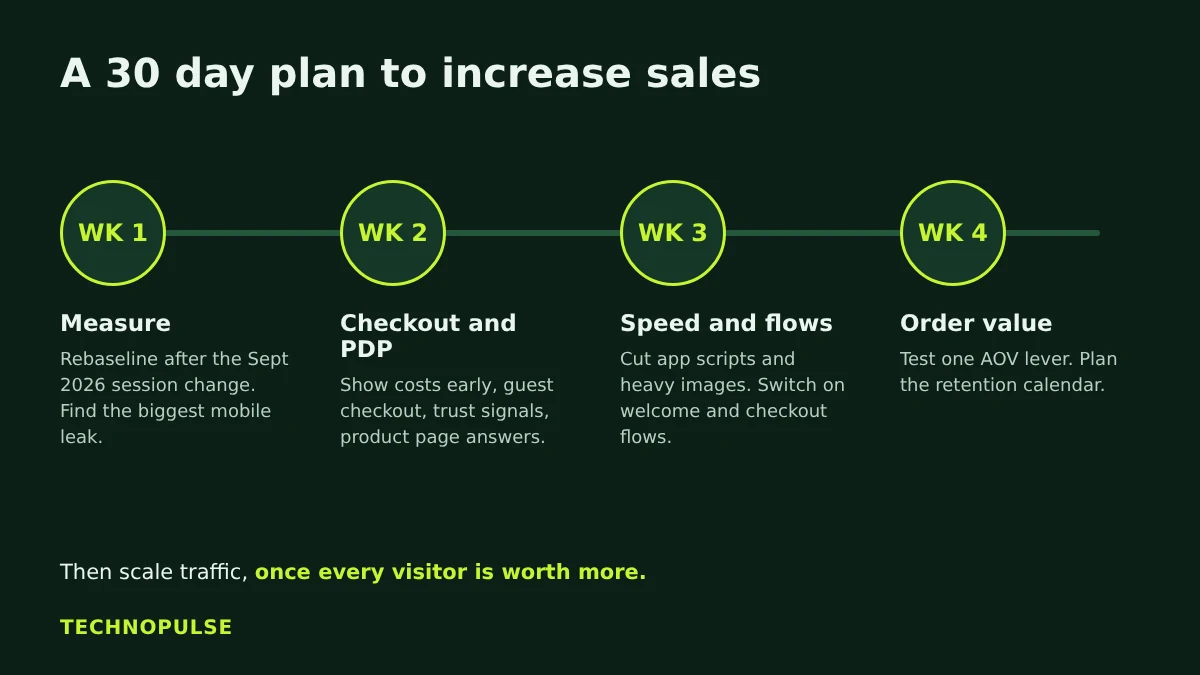
- Week 1: rebaseline analytics after the session change and find the biggest funnel leak on mobile.
- Week 2: fix checkout friction and the top product page gaps.
- Week 3: speed fixes, then switch on welcome and abandoned checkout flows.
- Week 4: test one order value lever and plan the retention calendar.
Only then decide how much more traffic to buy.
FAQ
How can I increase ecommerce sales without ads?
Improve conversion rate, average order value and repeat purchases first. Fixing checkout friction, product page gaps and mobile speed, then switching on automated email flows, grows revenue from the visitors you already have, with no extra ad spend.
What is the fastest way to increase online sales?
The fastest wins are usually in checkout: show shipping costs early, allow guest checkout, add trusted payment options and turn on an abandoned checkout email. These changes can go live within days and affect every order.
What is a good conversion rate for an online store?
It depends on your industry, price point and traffic mix, and Shopify’s September 2026 session change means older benchmarks no longer compare directly. Our conversion rate guide explains the current ranges and how to rebaseline.
How long does it take to see more sales?
Checkout and email fixes often show results within two to four weeks. Speed, product page and retention work usually takes one to three months to show clearly, and SEO takes longer but keeps compounding.
Want to know which step is costing you the most?
We have helped 200+ DTC brands since 2021, and we hold a 5.0 rating on Google from 40+ client reviews. Book a free Shopify store audit and we will show you the biggest leak in your funnel and what fixing it is worth. Or see how our Shopify CRO agency service works.
Related guides

Founder and CEO of TechnoPulse. Leads Shopify development, CRO and growth strategy for DTC brands in the US, Europe and Australia.
More about Haroon