 Technopulse

nopCommerce to Shopify Migration: A Step by Step Guide
How to move from nopCommerce to Shopify without losing data or rankings: export, clean, import, rebuild plugins as apps, map root URLs to /products/ and /collections/ with 301 redirects, test and launch outside the BFCM window.
 Haroon Ali ShahOctober 30, 2026 · 9 min read
Short answer: a nopCommerce to Shopify move works in five stages. Export your products, customers and orders from the nopCommerce admin, clean the data, import it into Shopify with CSV files or a migration app, rebuild the theme and plugin features on Shopify, then launch with a full set of 301 redirects from your old nopCommerce URLs to the new Shopify ones. Shopify’s own Store Migration app does not connect to nopCommerce, so you will use CSV files, a third party migration tool or a partner. The part most guides rush is SEO: nopCommerce puts product pages at the root of your domain and Shopify does not, so every product URL changes. Coming from WooCommerce instead? Follow our WooCommerce to Shopify migration guide.
We run Shopify migrations for DTC brands in the US, Europe and Australia. This guide is the process we follow, including the parts the tool vendors leave out.
When moving from nopCommerce to Shopify makes sense
nopCommerce is a capable open source platform built on ASP.NET. It suits teams with in house .NET developers who want full control of the code. Most DTC brands we talk to are not in that position. They are paying a developer to apply updates, fix plugin conflicts and keep hosting healthy, and that money is not going into growth.
Shopify makes sense when:
- You sell direct to consumers and want hosting, security and checkout handled for you.
- Your marketing team waits on a developer for simple page or promo changes.
- You want native tools for email, reviews, subscriptions and analytics through the Shopify App Store, plus integrations like Klaviyo.
- You run one brand on one storefront, or a small number of storefronts.
It needs more thought when you rely on nopCommerce features that have no direct Shopify match. Two come up most often. nopCommerce multi store lets you run several storefronts, each on its own domain, from one installation and one admin. nopCommerce vendor management turns a store into a marketplace where each vendor gets admin access to manage their own products and orders. On Shopify, multiple storefronts usually means running separate Shopify stores, and a marketplace means a dedicated app. Neither is a blocker, but both change the scope.
What migrates and what does not
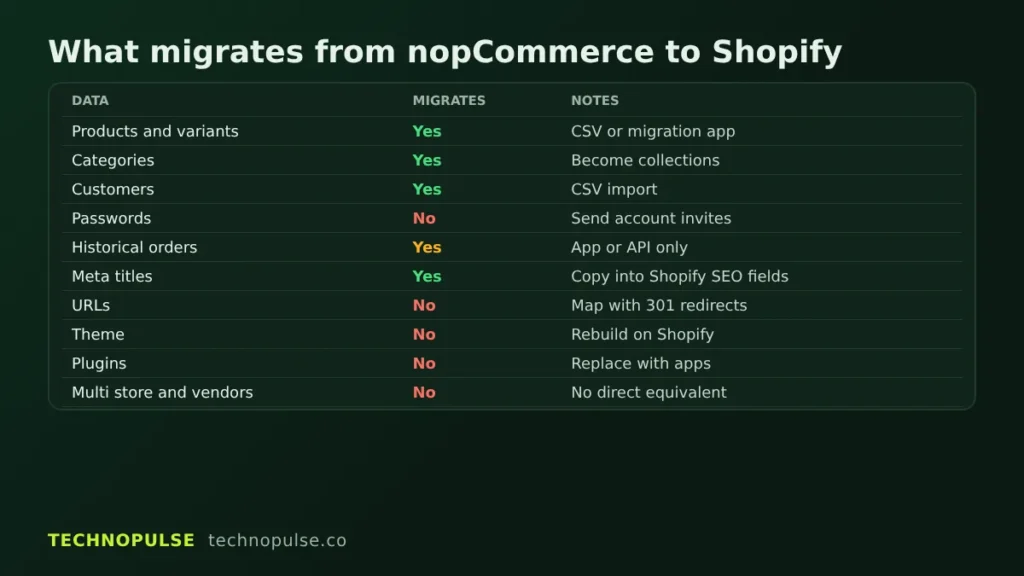
Shopify lists products, customers, historical orders, gift cards, blogs and pages as data you can bring over. Here is how that looks for a nopCommerce store in practice.
| Data | Migrates? | Notes |
|---|---|---|
| Products, variants, images | Yes | Shopify allows up to 3 options and 2,048 variants per product. Complex nopCommerce attribute setups may need restructuring. |
| Categories | Yes, as collections | nopCommerce categories become Shopify collections. Nested category trees become menus plus collections. |
| Customers | Yes | Names, emails, addresses, tags and marketing consent import by CSV. |
| Customer passwords | No | Shopify cannot import passwords from another store. Customers set a new one through an account invite or reset. |
| Historical orders | Yes, with an app or the API | There is no simple order CSV import in the Shopify admin. |
| Meta titles and descriptions | Yes | Export them from the nopCommerce SEO fields and map them to Shopify SEO fields. |
| URLs | No, they change | Every old URL needs a 301 redirect. |
| Theme and design | No | Rebuild on a Shopify theme. |
| Plugins and custom code | No | Replace with Shopify apps or custom development. |
| Multi store and vendor setups | No direct equivalent | Needs a separate plan. |
Pre migration audit
Before you export anything, write down what you have. This is the step that saves the most time later.
- Catalog: number of products, how many use attributes or combinations, and any product that would exceed 3 options.
- Plugins: every installed nopCommerce plugin and what it actually does for the business. Some can simply be dropped.
- Traffic pages: pull your top landing pages and backlinked URLs from Google Analytics and Search Console. These are the URLs you cannot afford to lose.
- Integrations: ERP, warehouse, accounting, email and feeds that read from nopCommerce.
- Customer list: who opted in to marketing, and who did not.
nopCommerce to Shopify, step by step
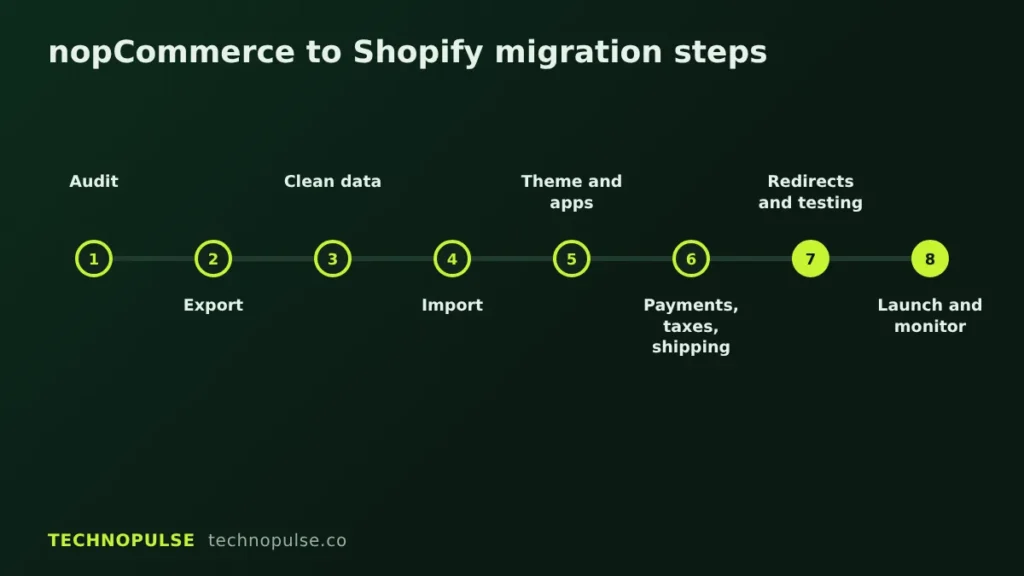
Step 1: Export your data from nopCommerce
In the nopCommerce admin, go to Catalog, then Products, and use the Export button. You can export products to Excel or XML, either all found products or a selection. The export includes product info, SEO fields and pictures. Customers export the same way from Customers, then Customers, with Export to Excel or Export to XML. Export orders too, and keep a full database backup as your safety net.
Step 2: Clean and reshape the data
Shopify expects its own CSV layout. Each product needs a Handle, which becomes its URL. Headers are case sensitive, files must be saved as UTF 8, and curly quotes cause import errors. Product and customer CSV files are capped at 15 MB each, so split large files. This is also the time to delete dead products, merge duplicates and fix missing images.
Step 3: Import with CSV or a migration app
Shopify recommends an import order: products first, then customers, then historical orders, so orders link to the right products and customers. You have three practical routes:
- CSV import: fine for products and customers on a smaller catalog. Orders are the hard part, since Shopify points you to the API or an app for those.
- Migration tools: services such as Cart2Cart and LitExtension list nopCommerce as a source, and Matrixify can import spreadsheet data you have converted to its template. Run a demo migration first and check the results by hand.
- A partner: our Shopify migration services cover the audit, data mapping, import and redirects as one project.
One tip: turn off staff new order notifications before importing orders. Otherwise every imported order sends an email.
For customers, set the marketing consent column honestly. Only mark someone as accepting email if they opted in. Then plan a short email sequence inviting customers to activate their new account, since passwords cannot be carried over.
Step 4: Build the theme
Your nopCommerce theme does not transfer. Pick a Shopify theme and build templates for product, collection, cart and content pages. Keep the theme lean. Every app script you add slows the store, which is why we pair rebuilds with Shopify speed optimization.
Step 5: Replace nopCommerce plugins with apps
Go back to your plugin list from the audit. For each one, decide whether Shopify does it natively, an app covers it, or it needs custom work. Reviews, wishlists, product filters, loyalty and subscriptions are usually app replacements. Custom pricing rules and checkout logic take more care.
Step 6: Payments, taxes and shipping
Set up Shopify Payments or your preferred gateway and place real test orders. Configure tax settings for each region you sell in, since US sales tax, EU VAT and Australian GST all work differently. Rebuild shipping zones and rates to match what customers pay today, so nobody sees a surprise at checkout.
SEO: protecting your rankings
This is where most nopCommerce to Shopify moves lose traffic. nopCommerce builds each URL from a search engine friendly page name at the root of the domain, such as yourstore.com/blue-tent. Shopify uses fixed prefixes: /products/ for products, /collections/ for categories, /pages/ for content and /blogs/ for posts.
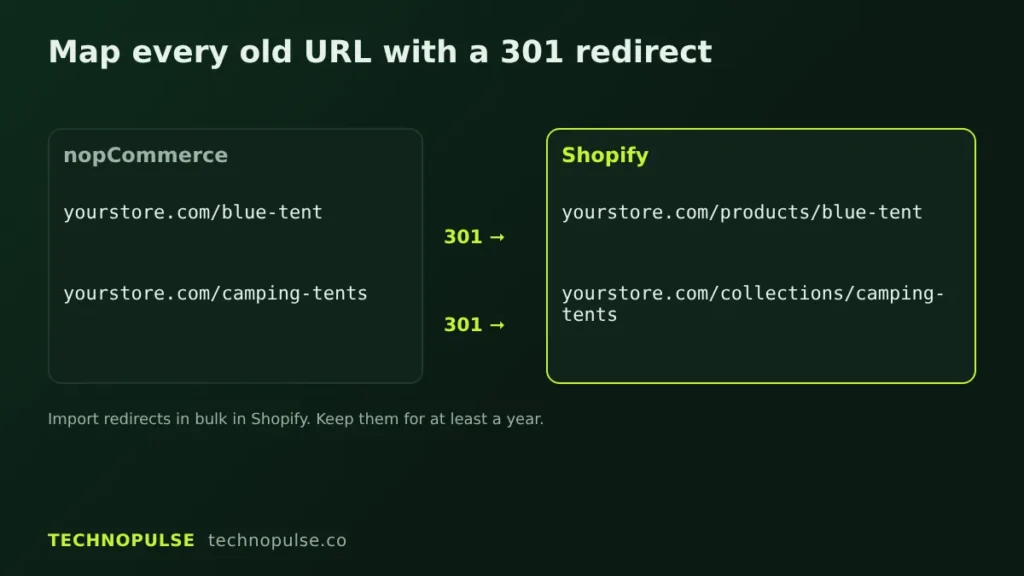
Map every old URL to a new one
Build a spreadsheet with two columns: the old nopCommerce path and the new Shopify path. Examples:
- /blue-tent becomes /products/blue-tent
- /camping-tents becomes /collections/camping-tents
- /shipping-returns becomes /pages/shipping-returns
Keep the same slug where you can. Set each Shopify product Handle to match the old nopCommerce page name, and the mapping becomes almost one to one. Google’s site move guidance says to map old URLs to new ones before the move and avoid redirect chains.
Bulk import the 301 redirects
In Shopify, go to Content, then Menus, then URL redirects, and use Import to upload your redirect CSV. Standard plans allow up to 100,000 redirects. Two catches from the Shopify redirect docs: a redirect only fires when the old path returns a 404 on Shopify, and some paths such as /cart and /collections/all cannot be redirected. Google recommends keeping redirects in place for at least a year. We keep them indefinitely.
Keep your meta titles and descriptions
Carry over the meta title and meta description from the nopCommerce SEO panel for every product and category. Pages that rank today should launch with the same titles, the same core copy and the same headings. Change one thing at a time, after launch.
Update Search Console
If your domain stays the same, you do not need the Change of Address tool. Submit the new Shopify sitemap in Search Console and watch the Page indexing report. Google notes rankings can fluctuate for a few weeks while it recrawls. For a deeper list, see this Shopify migration SEO checklist.
Testing checklist before launch
- Spot check products against nopCommerce: price, variants, stock, images, descriptions.
- Collection counts match category counts.
- Place test orders with each payment method, including a refund.
- Check tax and shipping totals for each country you sell to.
- Test customer account invites and password resets.
- Run your full redirect list through a crawler and confirm each one returns a single 301 to a live page.
- Check transactional emails, analytics, pixels and Klaviyo tracking.
- Test on mobile and on slow connections.
- Confirm integrations like ERP, warehouse and feeds read from Shopify.
When to go live
Do not switch platforms during peak season. Black Friday 2026 is 27 November, and most brands lock their stores well before it. If your migration is not tested and finished by early November, launch after Cyber Monday, ideally in January when traffic is calmer. Our Shopify Black Friday checklist covers what to lock down for peak.
On launch day, put the store live, connect the domain, check SSL and run the redirect list again on the live domain. Keep nopCommerce available behind the scenes for a few weeks in case you need to check old data.
After launch monitoring
- Check Search Console daily for the first two weeks for 404 errors, and add redirects for anything missed.
- Compare organic sessions and revenue on your top landing pages week over week.
- Watch conversion rate and checkout completion.
- Track how many customers activate accounts and resend the invite to those who did not.
Launch is the start, not the finish. For DOD Outdoors, an outdoor camping gear brand, a Shopify rebuild followed by CRO and email work grew online sales 5.8x and lifted conversion 49 percent. You can read the DOD Outdoors case study for how that work was sequenced.
After launch, compare conversion rates with care. Shopify changed how it counts sessions in September 2026, which our Shopify session update guide explains.
FAQ
Can I migrate from nopCommerce to Shopify for free?
Partly. You can export products and customers from nopCommerce and import them into Shopify by CSV at no cost. Historical orders, redirects at scale and data reshaping usually need a paid app or developer time.
Will I lose my Google rankings?
Not if you map every old URL and add 301 redirects before launch. Expect some movement for a few weeks while Google recrawls, as its own documentation says.
Can customers keep their passwords?
No. Shopify does not import passwords from another platform. Send account invites so customers can set a new password.
Does the Shopify Store Migration app support nopCommerce?
No. It supports platforms such as WooCommerce, Wix, Square, Etsy, Amazon, eBay and Lightspeed. For nopCommerce, use CSV files, a third party migration tool or a partner.
Get a free migration plan
TechnoPulse is a Shopify Partner and Klaviyo Partner. We have helped 200+ DTC brands since 2021, hold a 5.0 rating on Google from 40+ client reviews, and were named Best Performance Driven Ecommerce Agency USA 2025. If you are weighing a nopCommerce to Shopify move, we will review your store, map your URLs and catalog, and send you a free migration plan with scope and timing. Learn more about our Shopify migration services, or start with a free Shopify store audit.
Related guides

Founder and CEO of TechnoPulse. Leads Shopify development, CRO and growth strategy for DTC brands in the US, Europe and Australia.
More about Haroon
 Technopulse
