
Shopify Black Friday Checklist 2026: 25 Checks
The 25 checks to finish before Black Friday on 27 November 2026, from measurement and speed to checkout, Klaviyo warm up and USPS shipping cutoffs.
 Haroon Ali ShahOctober 29, 2026 · 10 min read
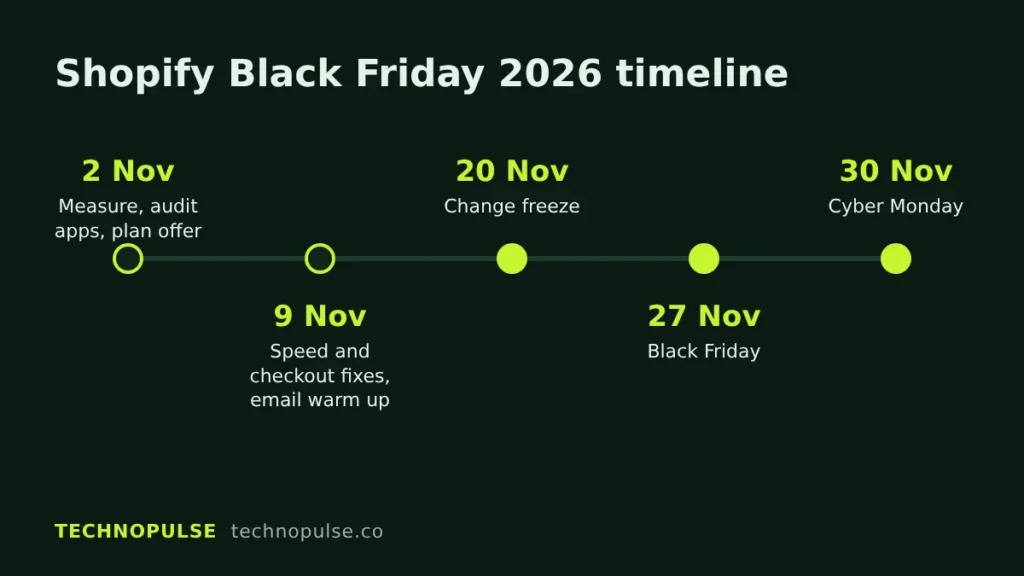
A Shopify Black Friday checklist is the short list of checks that keep your store fast, your checkout clean, your emails in the inbox and your orders shipping during the busiest four days of the year. In 2026 Black Friday falls on Friday 27 November and Cyber Monday on Monday 30 November, so the safe plan is to finish every change by Friday 20 November and spend the last week testing, not building. If you are adding or changing a payment provider before the peak, see our payment gateway integration service.
We run this list with DTC brands every autumn. It is ordered by what costs the most money when it breaks, and every number below comes from a named source you can check.
Why this year needs a written checklist
The stakes keep rising. Shopify merchants sold $14.6 billion over the 2025 Black Friday Cyber Monday weekend, up 27 percent on the year before, with sales peaking at $5.1 million a minute just after noon Eastern on Black Friday. For 2026, Adobe forecasts $275.1 billion in US online holiday spend, with $47.5 billion of it in Cyber Week alone: $12.9 billion on Black Friday and $15.1 billion on Cyber Monday.
Two things are different this year. First, Shopify changed how it counts sessions in September 2026, so your conversion rate baseline moved even if your store did not. Second, Adobe expects traffic from AI shopping assistants to be up 130 percent on last season. Both make last year’s reports a weaker guide, which is why the checklist starts with measurement.
The 4 week plan at a glance
- Week of 2 November: measurement, app audit, offer and margin plan.
- Week of 9 November: speed and checkout fixes, discount setup, email warm up starts.
- Week of 16 November: full test purchases on mobile, flows adjusted, support macros written. Change freeze on Friday 20 November.
- Week of 23 November: early access to your list, Black Friday on 27 November, Cyber Monday on 30 November, daily checks only.
Measurement checks (1 to 4)
1. Rebaseline your conversion rate
Shopify now ends a session after 30 minutes of inactivity and filters more bot traffic, so session counts and conversion rates changed around 21 to 23 September 2026. Compare November 2026 with the four weeks after that change, not with November 2025. Our guide to the Shopify session update shows how to build that new baseline and what a good Shopify conversion rate looks like now.
2. Pick three numbers for the war room
Revenue per session, checkout completion rate and mobile conversion rate. These three tell you within an hour whether something broke. Everything else can wait for the post sale review.
3. Check that every purchase is tracked once
Place a real order and confirm it appears once in Shopify, once in GA4 and once in each ad platform. Duplicate or missing purchase events during Cyber Week make your ad platforms bid on bad data at the most expensive time of year.
4. Write down last year’s peak hours
Shopify’s own peak in 2025 was just after noon Eastern on Black Friday. Your peak may be different. Pull your hourly orders from last year so you know when to watch the store and when to send the biggest emails.
Speed and stability checks (5 to 8)
5. Remove apps you will not use in November
Every storefront app adds script weight. Turn off trials, unused popups and duplicate review or upsell widgets now, while there is time to see the effect. Our guide to speeding up a Shopify store walks through finding the heaviest scripts safely.
6. Test the sale version of your pages
Countdown timers, announcement bars, sale badges and gift with purchase banners are usually added the night before and never tested. Build them now, switch them on in a duplicate theme, and check mobile speed with the sale elements visible.
7. Freeze theme and app changes on 20 November
No new apps, no theme updates and no checkout changes after the freeze. If something must change, publish it to a duplicate theme first and keep the previous theme ready to roll back in one click.
8. Know who fixes what
Write one line per system: theme, checkout, email, ads, shipping app, reviews app. Next to each, the person who answers and the support contact for the app. A broken shipping rate on Black Friday morning should not start with a search for a login. If nobody on your team owns that list, our ecommerce maintenance service can cover it through the peak.
If you want a second pair of eyes on speed before the freeze, our Shopify speed optimization service focuses on exactly these app and theme fixes.
Checkout checks (9 to 13)
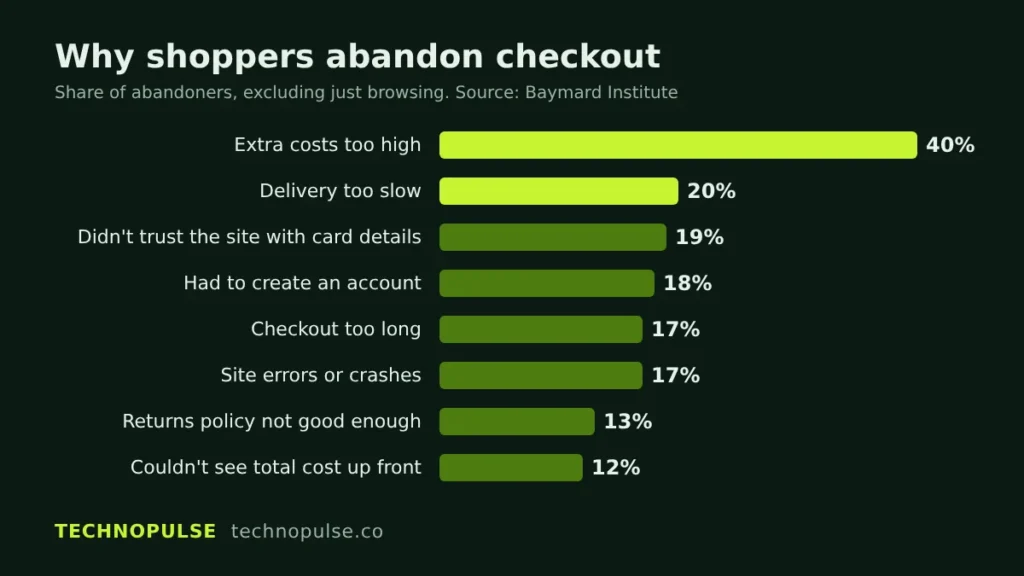
Baymard Institute puts the average documented cart abandonment rate at 70.22 percent. Among shoppers who abandoned for a reason other than browsing, the top causes are clear, and most of them are fixable before Black Friday.
9. Show the full cost before checkout
Extra costs being too high is the top reason at 40 percent, and 12 percent leave because they could not see the total cost up front. Put your shipping threshold and delivery cost on the product page and in the cart, not only in checkout.
10. Make delivery dates visible
Slow delivery drives 20 percent of abandonment. Show an estimated delivery window on product pages and add your holiday cutoff dates (see check 20).
11. Keep guest checkout on
18 percent of shoppers leave when a site wants them to create an account. Offer accounts after purchase, never before it.
12. Offer the payment methods your buyers use
Adobe forecasts $21.3 billion in buy now, pay later spending across November and December 2026, 82 percent of it on mobile. Make sure express wallets and your BNPL option appear on mobile checkout and on high price product pages.
13. Run five test orders
One on iPhone Safari, one on Android Chrome, one with a discount code, one with an automatic discount plus free shipping, and one to an international address if you sell abroad. Refund them after. This is the single most useful hour on the whole checklist. Our Shopify CRO checklist has the wider list of checkout fixes for the rest of the year.
Offer and discount checks (14 to 16)
14. Set the offer from margin, not from competitors
Adobe expects Cyber Week discounts to peak at about 30 percent in electronics, 29 percent in toys and 23 percent in apparel. You do not have to match those. Work out the deepest discount your contribution margin allows after shipping and ad cost, then pick an offer that fits under it. Bundles and gifts with purchase often protect margin better than a flat percentage.
15. Test how your discounts combine
On Shopify, product, order and shipping discounts only stack when each discount allows that combination. Per Shopify’s discount combination rules, a customer can use up to 5 product or order codes and 1 shipping code per order, two shipping discounts never stack, and up to 25 automatic discounts can be active. Test your exact Black Friday combination in checkout before you announce it.
16. Schedule discounts, do not switch them on by hand
Set start and end times in Shopify so the sale goes live at midnight in your main market without anyone awake. Check the time zone in your store settings first.
Email and SMS checks (17 to 19)
Email usually carries the biggest share of Black Friday revenue for DTC brands, and it is also where the most avoidable damage happens: a sudden jump in volume to an old list gets you filtered to spam on the day it matters most.
17. Warm up your sending volume
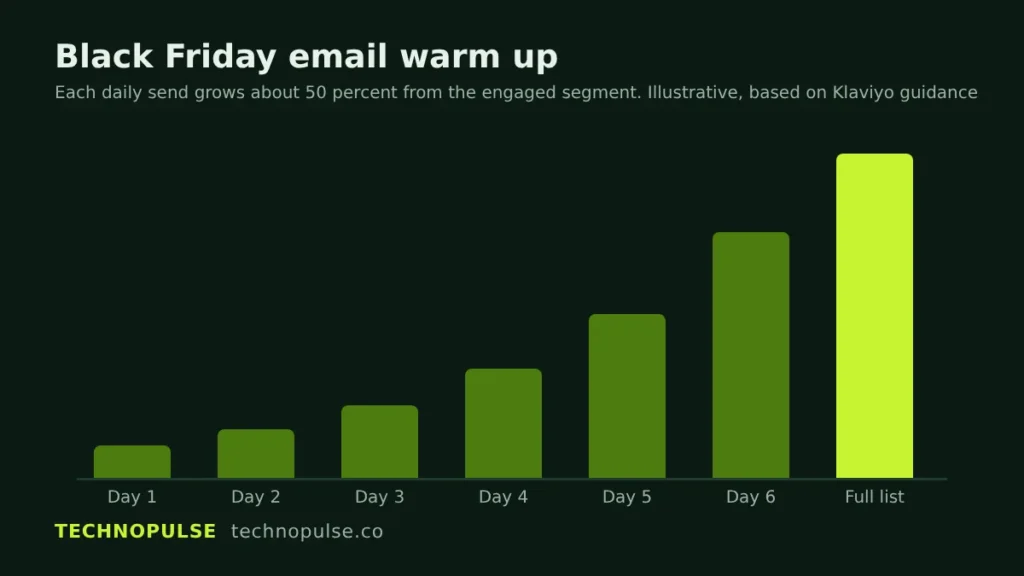
Klaviyo’s BFCM guidance is to start with your engaged audience and grow each daily send by about 50 percent until you approach your full list, leave a few buffer days, then pull back to your engaged segment just before the big send. For a large list this can take more than two weeks, so start in the week of 9 November.
18. Watch your spam rate
Google’s sender guidelines ask bulk senders to keep the reported spam rate below 0.10 percent and to never reach 0.30 percent. Set up Google Postmaster Tools now, check it daily during the warm up, and stop sending to unengaged profiles if the rate climbs.
19. Adjust your flows for sale week
Your abandoned checkout, browse abandonment and welcome flows keep running during the sale. Add the Black Friday offer to them, shorten waits where it makes sense, and stop sale emails from going to people who already bought. Our guide to Shopify abandoned checkout emails covers timing and filters, and our Klaviyo email marketing service can set this up for you.
Shipping, stock and support checks (20 to 23)
20. Publish holiday shipping cutoffs
For delivery by 25 December within the contiguous US, USPS recommends sending by 17 December for Ground Advantage and First Class Mail, 18 December for Priority Mail and 19 December for Priority Mail Express. Set your own order cutoff a day or two earlier to allow for packing, and show it in the announcement bar.
21. Check stock on your top 20 products
Most Black Friday revenue comes from a small set of products. Confirm stock levels, set low stock alerts, and decide in advance whether a sold out product hides, shows sold out, or takes back in stock signups.
22. Write the return policy shoppers will ask about
13 percent of abandoning shoppers in Baymard’s data left because the returns policy was not good enough. State the holiday return window clearly on product pages and in the cart.
23. Prepare support replies
Write saved replies for where is my order, discount code not working, shipping cutoff and returns. Add the same answers to your FAQ page so shoppers find them before they write in.
After the weekend (24 and 25)
24. Turn buyers into repeat customers
Black Friday buyers are expensive to win, so the post purchase flow matters more in December than any other month. A physician led supplement brand we work with now gets 85 percent of its orders from returning customers, and that started with getting the second order right.
25. Review within a week
Compare revenue per session, checkout completion and mobile conversion against your new baseline, list what broke, and write next year’s checklist while the details are fresh.
The 25 checks in one list
- Rebaseline conversion rate after the September session change
- Pick three war room numbers
- Confirm purchase tracking fires once
- Note last year’s peak hours
- Remove unused apps
- Speed test the sale version of key pages
- Freeze changes on 20 November
- List who fixes what
- Show full cost before checkout
- Show delivery dates
- Keep guest checkout on
- Offer express wallets and BNPL on mobile
- Run five test orders
- Set the offer from margin
- Test discount combinations
- Schedule discounts
- Warm up email volume
- Watch spam rate in Postmaster Tools
- Adjust flows for sale week
- Publish shipping cutoffs
- Check stock on top products
- Clarify holiday returns
- Prepare support replies
- Turn buyers into repeat customers
- Review within a week
Want proof this order of work pays off? An outdoor camping gear brand we rebuilt grew online sales 5.8x and lifted conversion 49 percent after we fixed measurement, product pages, checkout and email in that sequence. You can read the outdoor gear Shopify case study or see how our Shopify CRO agency service works.
Planning a platform move? Finish it well before your change freeze. Our nopCommerce to Shopify migration guide shows the URL mapping and redirect steps that protect your rankings.
Frequently asked questions
When is Black Friday 2026?
Black Friday 2026 is Friday 27 November, the day after US Thanksgiving on Thursday 26 November. Cyber Monday is Monday 30 November.
When should I start preparing my Shopify store for Black Friday?
Start at least four weeks before, in early November. Email warm up alone can take two weeks or more, and you want every theme, app and checkout change finished by about a week before Black Friday so the last week is only for testing.
Should I change my Shopify theme before Black Friday?
Only if the change is finished and tested before your freeze date. Publish it to a duplicate theme first, test checkout on mobile, and keep the old theme ready to roll back.
How much should I discount on Black Friday?
As much as your contribution margin allows after shipping and ad costs, and no more. Adobe expects Cyber Week discounts of about 23 percent in apparel and up to 30 percent in electronics, but bundles and gifts often beat a deeper percentage on profit.
Why did my Shopify conversion rate change before Black Friday?
Shopify changed how sessions are counted in September 2026, which moved conversion rates for many stores with no change to the site. Compare against the weeks after that change, not against last year.
Want us to run this checklist on your store? Book a free Shopify store audit and we will send back the fixes that matter most before 20 November.
Related guides
After the sale, keep the store healthy with our Shopify store maintenance checklist.

Founder and CEO of TechnoPulse. Leads Shopify development, CRO and growth strategy for DTC brands in the US, Europe and Australia.
More about Haroon