 Technopulse

Shopify Third Party Payment Gateway: 2026 Setup Guide
What a third party payment gateway really costs on Shopify, how to add one, and when Shopify Payments plus PayPal is the better setup.
 Haroon Ali ShahNovember 3, 2026 · 10 min read
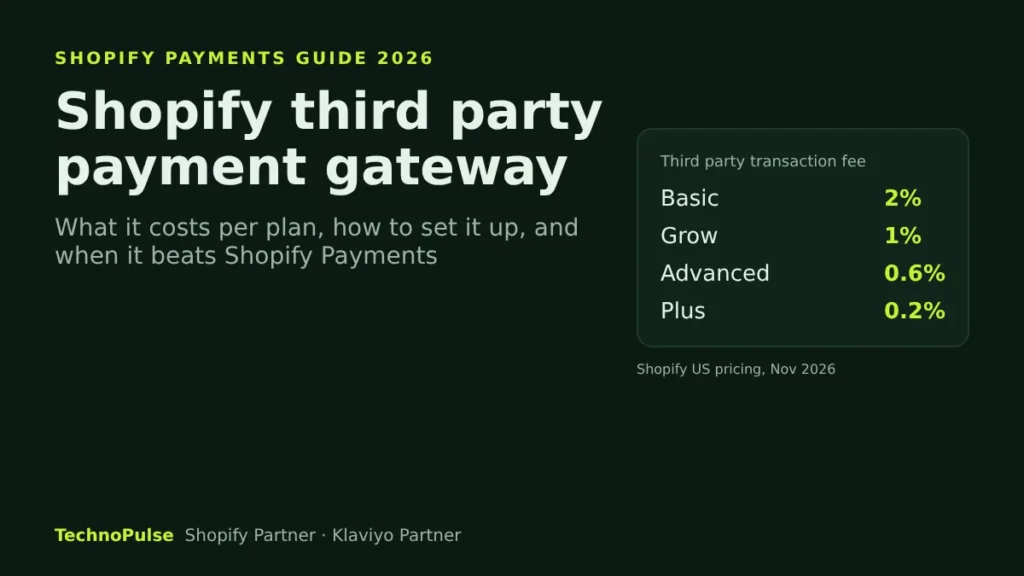
A Shopify third party payment gateway is any card processor you connect instead of Shopify Payments, and Shopify adds its own transaction fee on top of that processor’s fees: 2 percent on Basic, 1 percent on Grow, 0.6 percent on Advanced and 0.2 percent on Plus. Use one when Shopify Payments is not available for your country or business type, or when a processor gives you rates or features that beat that extra fee. Otherwise, Shopify Payments plus a few extra wallets is usually the cheaper and simpler setup.
I set up and fix checkouts for DTC brands in the US, Europe and Australia, and the payment step is where I see the quietest revenue leaks. A gateway that declines too many cards, a wallet that only shows on desktop, a fee nobody noticed on the invoice. This guide covers how third party gateways work on Shopify in 2026, what they really cost, how to add one without breaking checkout, and when a custom payment integration makes sense.
How payments work on Shopify
Shopify checkout has three kinds of payment options, and they are configured in different places under Settings > Payments:
- One credit card provider. This is either Shopify Payments or a third party provider. Shopify’s help center is direct about the limit: you can have only one credit card payment provider activated at a time.
- Additional payment methods. Wallets and alternative methods such as PayPal, buy now pay later providers and regional methods. Shopify says these are separate from the credit card provider, so you can run several of them next to your card gateway.
- Manual payment methods. Bank transfer, cash on delivery and similar offline options that you confirm by hand.
The older way to add a gateway, the open source ActiveMerchant library, is no longer used for new integrations. Today every third party provider connects through Shopify’s Payments Platform as an approved payments app, which is why the list of providers in your admin is curated rather than open.
What a third party gateway really costs on Shopify
This is the part most founders miss. When orders are processed through a third party or alternative gateway, Shopify charges a third party transaction fee on every one of those orders. That fee sits on top of whatever your processor charges you. Here are the current US rates from Shopify’s pricing page:
| Plan | Price, monthly billing | Price, yearly billing | Third party transaction fee |
|---|---|---|---|
| Basic | $39 a month | $29 a month | 2% |
| Grow | $105 a month | $79 a month | 1% |
| Advanced | $399 a month | $299 a month | 0.6% |
| Plus | from $2,300 a month | not offered | 0.2% |
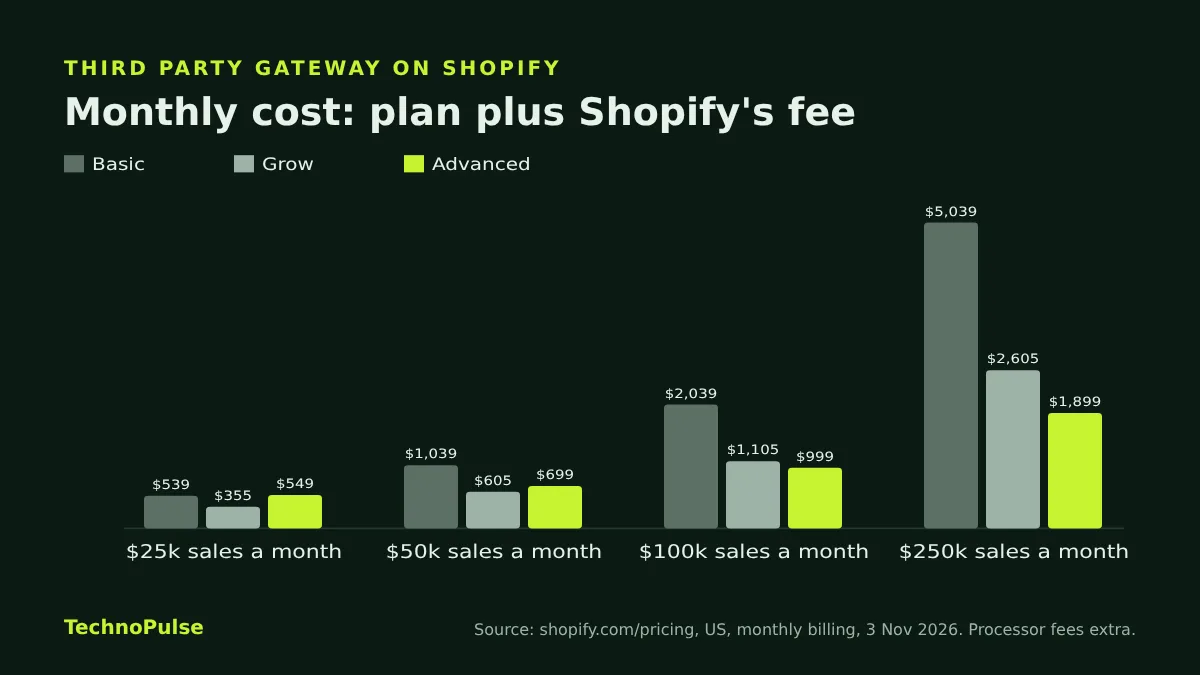
Run the numbers on your own sales before you decide. A store doing $100,000 a month on Grow with a third party card processor pays Shopify $1,000 a month in third party fees, before the processor takes its cut. On Advanced, the same store pays $600. That $400 difference is larger than the $294 gap in plan price, so for that store Advanced is the cheaper plan, even before you count its other features.
Break even points between plans
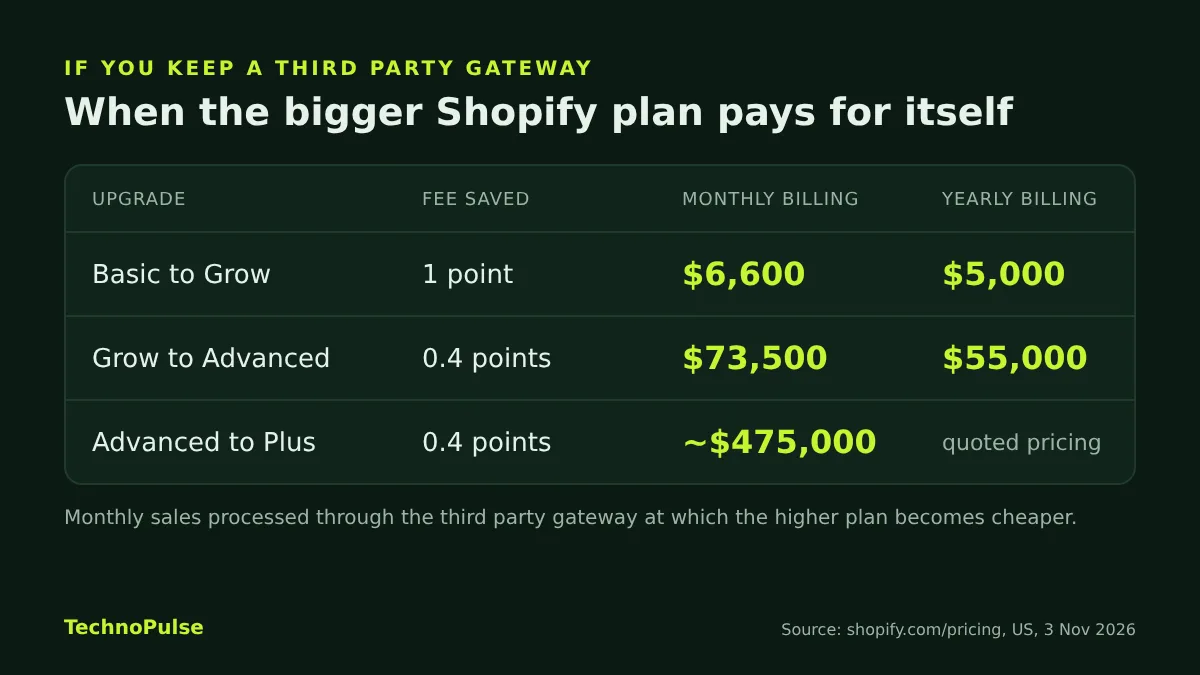
If you are staying on a third party gateway, the fee difference eventually pays for the bigger plan. Using the monthly billing prices above:
- Basic to Grow: the $66 price gap is covered once third party processed sales pass about $6,600 a month.
- Grow to Advanced: the $294 gap is covered at about $73,500 a month.
- Advanced to Plus: the gap of at least $1,901 is covered at roughly $475,000 a month, and Plus pricing is quoted, so check your own quote.
On yearly billing the break even points drop to about $5,000 a month for Basic to Grow and $55,000 a month for Grow to Advanced.
The PayPal exception
PayPal is the payment method that confuses people most. Shopify’s PayPal help page says third party transaction fees apply to transactions through third party and alternate gateways, even when Shopify Payments is activated. The exception: if you use Shopify Payments as your primary payment provider, PayPal transactions are exempt from those fees. PayPal still charges its own fees. So the cheap setup for most US, UK, EU and Australian brands is Shopify Payments as the card provider plus PayPal as an additional method.
When a third party gateway is the right call
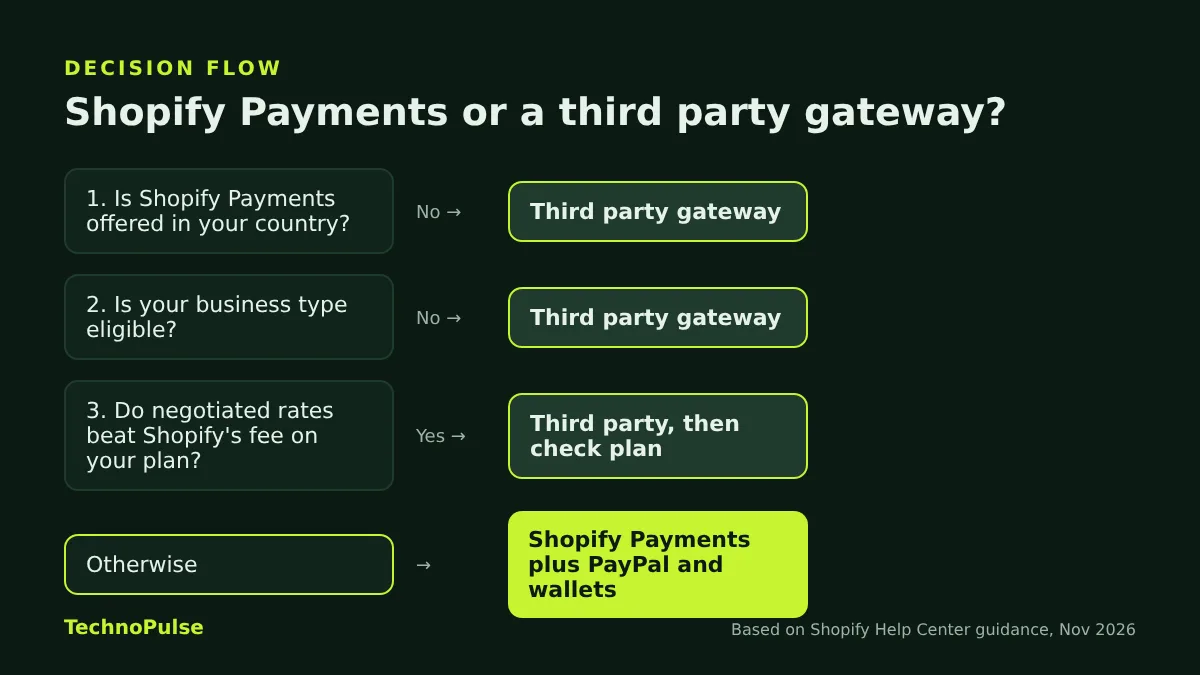
Shopify Payments is listed as available in 41 countries and territories, including the United States, Canada, the United Kingdom, Australia, New Zealand and most of the EU. Even in those countries there are good reasons to choose a third party gateway:
- Your business type is not eligible. Shopify asks you to confirm your business type is eligible before activating Shopify Payments. Some product categories need a specialist processor.
- Your country is not on the list. If your business entity is outside the supported countries, a third party provider is the only way to take cards.
- You already have negotiated processing rates. Larger brands often have custom rates with a processor that, after the Shopify fee, still come out ahead. On Plus, with a 0.2 percent fee, this happens more often.
- You need one processor across channels. If your marketplace, subscription or B2B sales already run through one processor, keeping Shopify on the same one can simplify reconciliation and fraud rules.
- Your customers expect a local method. Some regional methods are only offered through a third party app. These usually go in additional payment methods, not as your card provider.
If none of these apply, the extra fee is usually money left on the table. I would rather a client spend that budget on conversion work that lifts checkout completion.
How to add a third party payment gateway to Shopify
These steps follow Shopify’s guide to configuring third party providers. Only the store owner can add or change a payment provider, so plan the change with them.
- Open your payment settings. In the Shopify admin, go to Settings > Payments.
- Pick the right path for your store. If Shopify Payments is active, click Manage in the Shopify Payments section, then Switch to a third party provider at the bottom of the page. If Shopify Payments is not active, click See all other providers. If Shopify Payments is not available in your country, click Choose a provider in the Payment providers section.
- Choose your provider and enter its credentials. Have your merchant account details ready before you start.
- Click Activate, then Save.
- Keep the old provider’s credentials until refunds are done. Shopify removes your previous provider from the settings but lets you keep it for returns, so do not delete its details before you switch.
Adding PayPal, wallets and buy now pay later
Additional methods live in their own section of the same page:
- Go to Settings > Payments.
- In Additional payment methods, click Add payment methods.
- Search for the method or provider, choose it and click Activate.
- Enter your account details. If the provider is an app, install it, connect your account inside the app, then activate it.
Shopify notes that once activated, a method shows at checkout only when it is available for the customer’s market. That matters for brands selling into Europe and Australia, where the methods customers see can differ by country.
The checkout test I run after every gateway change
A gateway switch is a checkout change, and checkout changes deserve a proper test. This is the routine my team runs before we call a payment setup finished:
- Place a real order on every method. Card, each wallet, each buy now pay later option, on both iPhone and Android, then refund them.
- Test a 3D Secure card. European customers will hit this flow often, so make sure the challenge screen loads and returns to the thank you page.
- Test each market you sell to. Use Shopify Markets preview or a VPN to confirm the right methods and currency show per country.
- Check order tags and tracking. Confirm the purchase event still fires in GA4, Meta and Klaviyo for each method, especially offsite methods that redirect the customer.
- Check a refund and a partial refund. Finance teams find out about broken refund flows weeks later, when it is painful.
- Watch the first week. Compare checkout completion and the share of orders by method against the week before. A sudden drop on one method usually means a display or decline problem.
Payment failures also feed your recovery emails. If you have not tuned them yet, my guide to Shopify abandoned checkout emails covers the flows that win back customers who stalled at this step, and the Shopify CRO checklist has the rest of the checkout fixes.
Can you build a custom payment gateway on Shopify?
Sometimes a brand has a processor that is not in Shopify’s list. The honest answer is that you cannot just plug in your own gateway with code. According to Shopify’s developer documentation, only approved Partners can build payments extensions on Shopify’s Payments Platform, and payments apps must be approved by Shopify. The extension types include:
- Credit card extensions that take card payments in checkout, with 3D Secure support.
- Custom credit card extensions that define their own hosted card fields.
- Alternative extensions for other payment methods, with or without a redirect.
- Offsite extensions that send the buyer to a hosted payment page.
- Redeemables for third party gift cards.
Shopify also states that building a custom payment extension is limited to eligible Shopify Plus merchants, and you confirm eligibility with Plus support. In practice, for most brands the faster route is to ask your processor whether they already have an approved Shopify app, or to choose a processor that does. If you are moving platforms partly because of payments, factor this in early in your Shopify migration plan.
Mistakes I see most often
- Paying the fee by accident. A store switches to a third party card provider for one reason, forgets about it, and pays 1 to 2 percent on every order for a year.
- Too many methods. Ten payment logos do not lift conversion. Show the methods your customers actually use in each market and remove the rest.
- Wallets missing on mobile. Express buttons that only render on desktop, or sit below the fold on mobile, cost real orders. Check the mobile cart and checkout every time.
- No owner for declines. Nobody watches the decline rate after a switch. Ask your processor for decline reasons in the first month.
- Tracking breaks on redirects. Offsite methods can skip your thank you page scripts. Confirm purchases from every method reach your analytics.
Checkout is the step that turns all the work on ads, email and product pages into revenue. It is one reason the outdoor gear brand in our case study grew online sales 5.8x with a 49 percent conversion lift: every step to the order was treated as part of the job. If you want a second pair of eyes on your payment setup, our Shopify payment gateway integration team can review it.
FAQ
Does Shopify charge a fee if I use a third party payment gateway?
Yes. Shopify charges a third party transaction fee on orders processed through third party and alternate gateways: 2 percent on Basic, 1 percent on Grow, 0.6 percent on Advanced and 0.2 percent on Plus, per its US pricing page in November 2026. Your processor’s own fees are extra.
Can I use PayPal and Shopify Payments together?
Yes. PayPal is added under Additional payment methods, separate from your card provider. If Shopify Payments is your primary payment provider, Shopify says PayPal transactions are exempt from third party transaction fees. PayPal still charges its own fees.
How many credit card gateways can a Shopify store use?
One. Shopify allows only one credit card payment provider to be active at a time. You can still offer several wallets and alternative methods next to it.
Can I build my own payment gateway for Shopify?
Not without Shopify’s approval. Only approved Partners can build payments extensions, payments apps must be approved by Shopify, and custom payment extensions are limited to eligible Shopify Plus merchants.
Is Shopify Payments available in my country?
Shopify lists 41 supported countries and territories, including the US, Canada, the UK, Australia, New Zealand and most EU countries. Your business type also has to be eligible. If either check fails, you will need a third party provider.
Get a free payment and checkout audit
TechnoPulse is a Shopify Partner and Klaviyo Partner that has helped 200+ DTC brands since 2021, rated 5.0 on Google from 40+ client reviews. If you are not sure whether your gateway setup is costing you fees or orders, request a free store audit. We will check your payment settings, fees by plan and the mobile checkout, and send you a short list of fixes in priority order.

Founder and CEO of TechnoPulse. Leads Shopify development, CRO and growth strategy for DTC brands in the US, Europe and Australia.
More about Haroon
 Technopulse
