
Shopify Plus CRO: What Changes on Plus in 2026
What Shopify Plus changes for CRO in 2026, what every plan already has, and a 90 day plan to use checkout extensions, Functions and Rollouts.
 Haroon Ali ShahNovember 23, 2026 · 8 min read
Shopify Plus CRO is conversion rate optimization that uses the levers only Plus unlocks: checkout UI extensions on the information, shipping and payment steps, and custom apps built on Shopify Functions. Everything else, including native A/B testing through Rollouts, is now available on lower plans, so a Plus CRO program should spend its first months on checkout and offer logic, not on theme tweaks any store could make.
That distinction matters more in 2026 than it ever has. Shopify Scripts stopped running on June 30, 2026, Rollouts brought native experiments to most plans, and the checkout is now built from extensions instead of code edits. If you pay for Plus and your CRO roadmap looks the same as it would on the Shopify plan, you are leaving the expensive part of your subscription unused. This guide covers what changes on Plus, what does not, a 90 day plan, and how to run tests that give you an answer you can trust.
What actually changes for CRO on Shopify Plus
Most CRO work happens on the storefront: product pages, collection pages, the cart, search and speed. None of that needs Plus. The differences sit in three places: the checkout, custom business logic and who owns the code.
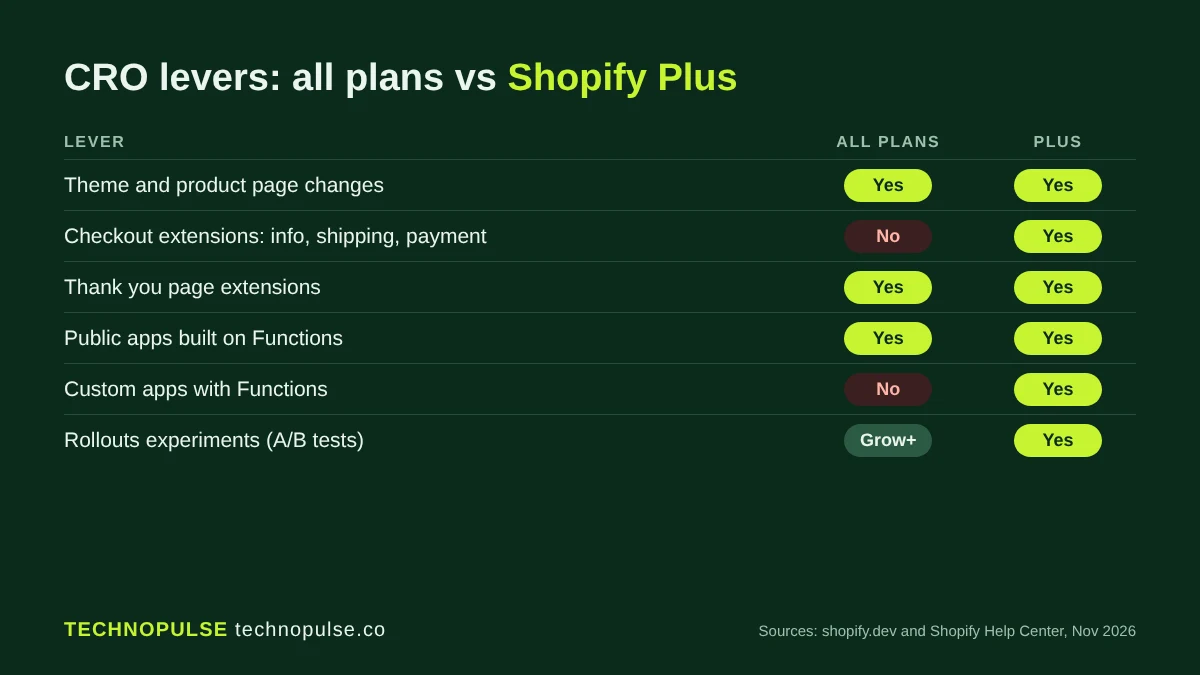
| CRO lever | All plans | Shopify Plus |
|---|---|---|
| Theme and product page changes | Yes | Yes |
| Checkout UI extensions on information, shipping and payment steps | No | Yes |
| Thank you page extensions | Yes | Yes |
| Public App Store apps built on Shopify Functions | Yes | Yes |
| Your own custom app with Shopify Functions | No | Yes |
| Rollouts scheduling and launches | Basic and higher | Yes |
| Rollouts experiments (A/B tests) | Grow and higher | Yes |
Two lines in that table come straight from Shopify’s developer documentation. The checkout UI extensions reference states that extensions for the information, shipping and payment steps are available only to stores on Shopify Plus. The Shopify Functions overview says stores on any plan can use public apps that contain functions, but only Plus stores can use custom apps that contain Function APIs, and some Function capabilities are Plus only.
The testing line surprises most founders. Shopify’s Rollouts requirements page says rollouts are available on the Basic plan or higher and experiments on the Grow plan or higher. Native A/B testing is not a reason to upgrade. It is a reason to start testing whatever plan you are on.
The Shopify Plus CRO toolkit in 2026
1. Checkout UI extensions
On Plus you can add blocks inside the checkout steps where buyers hesitate. Typical uses that move conversion:
- Delivery date or dispatch cut off messages on the shipping step, so buyers stop guessing.
- Trust content next to payment: guarantees, returns window, a short line on who you are.
- Gift notes, order notes or required fields captured in checkout instead of a fragile cart form.
- A single, relevant add on offer in checkout rather than a stack of upsells in the cart drawer.
The rule we follow: every block must answer a question buyers actually ask. If support tickets, chat logs and session recordings do not show the question, the block is clutter and will cost conversion.
2. Shopify Functions for offers and checkout rules
Functions run your business logic inside Shopify’s own infrastructure. Shopify’s tutorials cover discounts, payment options, delivery options, checkout validation, bundles and more. For CRO, the useful patterns are:
- Tiered or conditional discounts that apply automatically, so no one abandons checkout hunting for a code.
- Hiding or reordering payment methods by market or cart value, so the option most buyers choose sits first.
- Hiding delivery options that cause disappointment, such as slow methods for items people need fast.
- Validation that blocks a bad order early, for example a quantity limit on a launch, with a clear message instead of a cancelled order later.
Public apps built on Functions work on any plan. Plus earns its money when your rule is specific to your business and you want it in a custom app you control.
3. Rollouts for experiments and safe launches
Rollouts lets you schedule, gradually release and test changes to your main theme, checkout and accounts configuration, discounts and catalogs. Shopify’s June 2026 changelog post added scheduling, gradual publishing and A/B testing of themes and checkout setups. For a Plus brand that means you can test a checkout configuration with extensions against your current one, not only a product page layout.
4. Life after Shopify Scripts
Shopify stopped editing and publishing Scripts on April 15, 2026, and Scripts stopped running on June 30, 2026, according to the Shopify developer changelog. If your old line item, shipping or payment Scripts were never rebuilt, your store may be running without promotions or rules you assume are live. Check this before any new test, because a missing discount rule can wreck a conversion baseline.
A 90 day Shopify Plus CRO plan
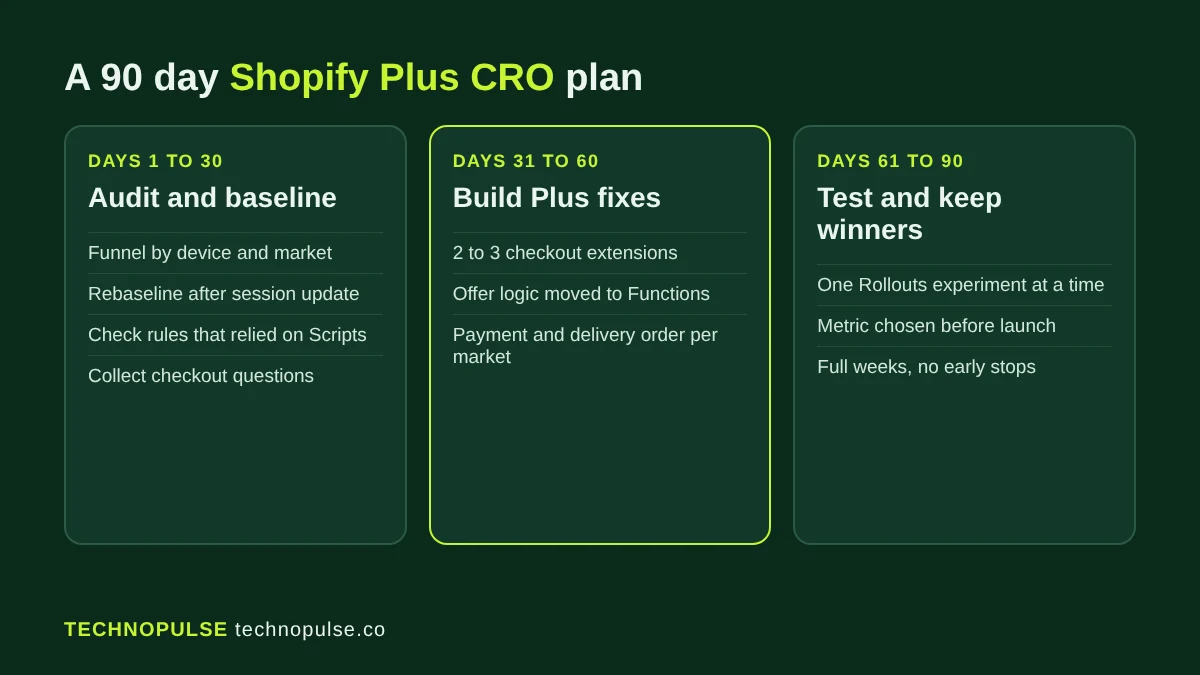
Days 1 to 30: audit and baseline
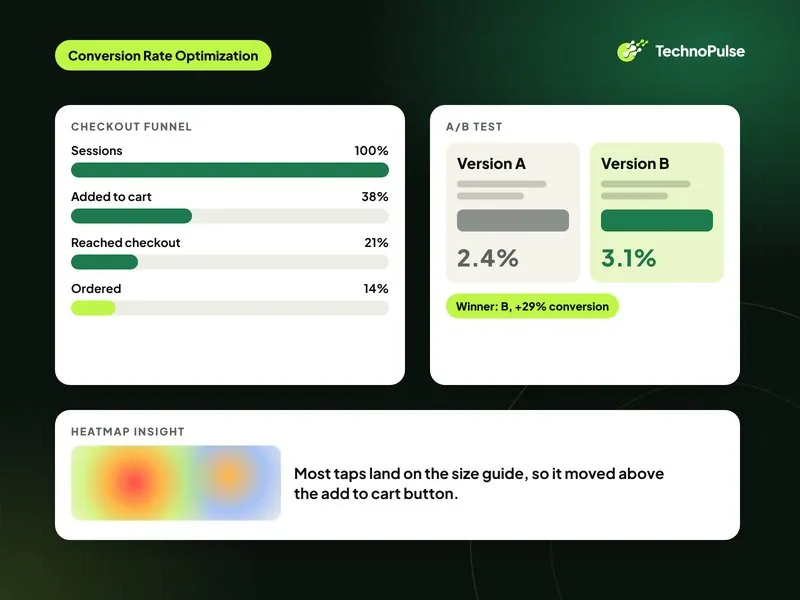
- Pull the funnel from Shopify analytics: sessions, add to cart rate, reached checkout rate and conversion rate by device and market. Note that Shopify changed how sessions are counted in September 2026, so compare like with like. Our guide to the Shopify session update explains how to rebaseline.
- List every active discount, payment and delivery rule and confirm none depended on Scripts.
- Read support tickets and chat for checkout questions. These become your extension backlog.
- Run a full storefront review with the Shopify CRO checklist so obvious theme fixes ship before you test.
Days 31 to 60: build the Plus specific fixes
- Ship the two or three checkout extensions that answer the most common questions.
- Move offer logic into Functions so discounts apply without codes where that fits your margin.
- Clean payment and delivery options per market. Our Shopify checkout optimization guide covers the order of work.
Days 61 to 90: test and keep what wins
- Run one Rollouts experiment at a time on your highest traffic template or on the checkout configuration.
- Decide the success metric before launch. For a checkout experiment Shopify reports checkout conversion rate; for a theme experiment it reports conversion rate, bounce rate, reached checkout rate and add to cart rate.
- Launch the winner, log the result and pick the next test from the backlog.
What to test first on Plus
Order your backlog by traffic, then by how close the change sits to the payment button. On most Plus stores we start here:
- Shipping step clarity. Delivery promise and costs shown before buyers reach the step where they used to find out.
- Automatic offers versus codes. A Functions based automatic discount against the same offer behind a code.
- Payment method order. The most used local methods first in each market.
- Product page proof. Reviews, guarantee and delivery promise above the fold on the top 10 products by revenue. See the product page optimization guide for the full list.
- Thank you page. A post purchase survey or referral block, which works on every plan and feeds the next round of tests.
How to run a Rollouts experiment you can trust
Rollouts is simple to start and easy to misread. Shopify’s documentation sets a few rules worth knowing before you launch:
- The default split is 50 percent control and 50 percent treatment, with an end date 90 days after the start. You can edit both before saving.
- Only visitors who consent to tracking are counted in results, and bot traffic is excluded. Your sample will be smaller than your session count.
- Theme and checkout changes apply only to the online store. Headless storefronts and custom storefront checkouts cannot be tested this way, and Liquid template changes cannot be part of a rollout.
- Changing the traffic split affects only new visitors, so set it once and leave it.
Our rules on top: one experiment per page type at a time, run full weeks so weekday and weekend buyers are both in the sample, and never stop a test the day it first looks like a win. If you are on headless Shopify, you need a separate testing tool for the storefront.
Common Shopify Plus CRO mistakes
- Paying for Plus and only editing the theme. That work is valuable, but it does not need Plus.
- Stuffing the checkout. Extensions make it easy to add blocks. Each one adds reading time between the buyer and the payment button.
- Testing during a promotion. A Black Friday week will skew any result. Use Rollouts events for promotions and run experiments outside them.
- Assuming old Scripts still run. They do not. Audit discounts and shipping rules first.
- Reading conversion rate alone. Track average order value and revenue per visitor too, because an offer can lift conversion and cut margin.
When Plus CRO is worth outside help
If you have the traffic for Plus, small lifts carry real money, and the work spans theme code, checkout extensions, Functions and analytics. That is where an agency that works on all four saves months. Our team has helped 200+ DTC brands since 2021. One example: DOD Outdoors, an outdoor gear brand, grew online sales 5.8x and lifted conversion 49 percent in year one after we rebuilt the store and tightened its product pages. Read the DOD Outdoors case study, see how we price programs in how much Shopify CRO costs, or check whether Plus fits you at all in Shopify vs Shopify Plus.
When you are ready, our Shopify CRO agency team can run the audit and the first 90 days with you.
Shopify Plus CRO FAQ
Do I need Shopify Plus to A/B test on Shopify?
No. Shopify’s Rollouts experiments are available on the Grow plan or higher, and rollouts without experiments start on the Basic plan. Plus adds checkout extensions you can then test, not the testing feature itself.
What can I customize in checkout on Shopify Plus?
Plus stores can add checkout UI extensions to the information, shipping and payment steps, and can run custom apps built on Shopify Functions for discounts, payment options, delivery options and validation. Thank you page extensions are available on all plans.
What replaced Shopify Scripts?
Shopify Functions. Scripts could not be edited after April 15, 2026 and stopped running on June 30, 2026. Rebuild old rules with public apps built on Functions or, on Plus, with your own custom app.
How long should a Shopify Plus CRO test run?
Run at least two full weeks and until each variant has enough orders to compare. Rollouts defaults to a 90 day end date, which you can shorten, but stopping as soon as a result looks good is the most common way to ship a false win.
Want to know which Plus levers would pay off on your store? Get a free Shopify store audit and we will show you the three changes we would make first.

Founder and CEO of TechnoPulse. Leads Shopify development, CRO and growth strategy for DTC brands in the US, Europe and Australia.
More about Haroon